
User Guide






Table Of Contents
- USER’S GUIDE MFC-8480DN/MFC-8680DN/MFC-8690DW/MFC-8890DW
- Brother numbers
- Ordering accessories and supplies
- Notice - Disclaimer of Warranties (USA and Canada)
- Compilation and Publication Notice
- Brother™ One-Year Limited Warranty and Replacement Service (USA Only)
- BROTHER MULTIFUNCTION CENTER / FAX MACHINELIMITED WARRANTY (Canada only)
- Table of Contents
- Section I: General
- 1 General information
- Using the documentation
- Accessing the Software User’s Guide and Network User’s Guide
- Viewing documentation
- Viewing documentation (Windows®)
- How to find scanning instructions
- Software User’s Guide:
- ScanSoft™ PaperPort™ 11SE with OCR How-to-Guides:
- How to find Network setup instructions (MFC-8690DW and MFC-8890DW)
- Viewing documentation (Macintosh)
- How to find scanning instructions
- Software User’s Guide:
- Presto! PageManager User’s Guide:
- How to find Network setup instructions (MFC-8690DW and MFC-8890DW)
- Viewing documentation
- Accessing Brother support (Windows®)
- Control panel overview
- 2 Loading paper and documents
- 3 General Setup
- 4 Security features
- 1 General information
- Section II: Fax
- 5 Sending a fax
- How to fax
- Broadcasting
- Additional sending operations
- 6 Receiving a fax
- 7 Telephone services and external devices
- 8 Dialing and storing numbers
- 9 Remote Fax Options
- 10 Polling
- 11 Printing reports
- 5 Sending a fax
- Section III: Copy
- Section IV:Direct printing
- Section V:Software
- Section VI: Appendixes
- A Safety and legal
- B Options
- C Troubleshooting and routine maintenance
- D Menu and features
- E Specifications
- F Glossary
- Index
- brother USA/CAN
Troubleshooting and routine maintenance
143
C
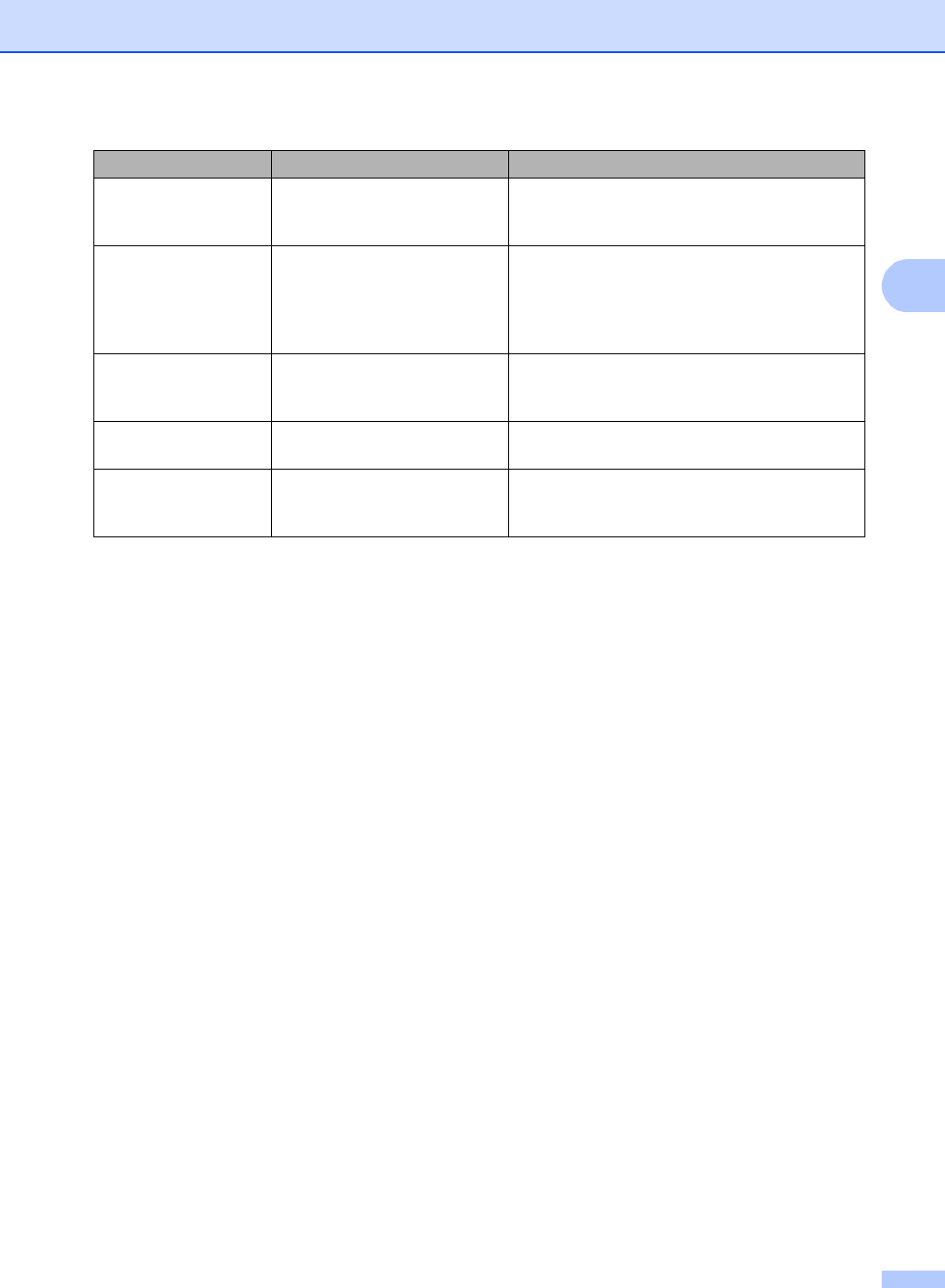
Size mismatch The paper in the tray is not the
correct size.
Load the correct size of paper in the tray and
set the “Paper Size” (Menu, 1, 2, 2 (See Paper
Size on page 23).
Toner Low If the LCD shows Toner Low,
you can still print; however, the
machine is telling you that the
toner cartridge is near the end
of its life.
Order a new toner cartridge now.
Too Many Files There are too many files stored
on the USB Flash memory
drive.
Reduce the number of files stored on the USB
Flash memory drive.
Too Many Trays More than one optional tray is
installed.
The maximum number of optional trays is one.
Remove any additional trays.
Unusable Device An incompatible or broken
device has been connected to
the USB direct interface.
Remove the USB Flash memory drive from the
USB direct interface. Turn the machine off and
then on again.
Error Message Cause Action