Software User's Guide
Manuals
Brands
Brother Manuals
All in One Printer
MFC 8480DN
111
112
113
114
115
116
117
118
119
120
Table Of Contents
软件使用说明书 DCP-8070D DCP-8085DN MFC-8370DN MFC-8880DN
目录
Windows®
打印
使用 Brother 打印机驱动程序
打印文档
双面打印
在纸张上进行双面打印的指导
自动双面打印
手动双面打印
同时进行扫描、打印和传真
打印机操作键
取消作业
安全模式键
打印机仿真支持
打印内部字体列表
打印打印机配置列表
测试打印
双面打印
恢复打印机默认设置
状态监控器
监控设备状态
打印机驱动程序设置
Windows® 打印机驱动程序中的功能
基本选项卡
纸张大小
方向
份数
介质类型
分辨率
打印设置
多页
双面打印/小册子打印
纸张来源
高级选项卡
使用水印
水印设置
页眉页脚打印
节墨模式
加密打印
管理员
用户认证 (适用于 DCP-8085DN 和 MFC-8880DN)
其他打印选项
附件选项卡
技术支持
BR-Script 3 (PostScript® 3™ 仿真语言) 打印机驱动程序中的功能
打印首选项
高级选项
端口选项卡
扫描
使用 TWAIN 驱动程序扫描文档
扫描文档到计算机
预览图像然后剪切,保留要扫描的部分
扫描仪设置对话框
使用 WIA 驱动程序扫描文档 (适用于 Windows® XP/Windows Vista®)
WIA 兼容
扫描文档到计算机
使用平板扫描器预览图像然后剪切,保留要扫描的部分
使用 WIA 驱动程序扫描文档 (适用于 Windows 图片收藏和 Windows 传真及扫描)
扫描文档到计算机
使用平板扫描器预览图像然后剪切,保留要扫描的部分
使用扫描键 (适用于 USB 或并行电缆用户)
扫描到 USB
扫描到电子邮件
扫描到图像
扫描到 OCR
扫描到文件
使用 Presto! PageManager
功能
Presto! PageManager 系统要求
ControlCenter3
使用 ControlCenter3
切换用户界面
关闭自动加载功能
扫描
文件类型
图像 (示例:Microsoft® Paint)
OCR (文字处理程序)
电子邮件
文件
自定义扫描
文件类型
用户自定义按钮
复印
PC-FAX (仅适用于 MFC 机型)
发送
接收/浏览接收
地址簿
设置
设备设定
远程设置 (仅适用于 MFC 机型)
快速拨号 (仅适用于 MFC 机型)
状态监控器
使用说明书
网络扫描 (适用于内置网络支持的机型)
使用网络扫描前
网络许可证
配置网络扫描
使用扫描键
扫描到电子邮件 (PC)
扫描到电子邮件 (电子邮件服务器) (仅适用于MFC-8880DN)
扫描到图像
扫描到 OCR
扫描到文件
扫描到 FTP (不适用于 DCP-8070D)
扫描到网络 (不适用于 DCP-8070D)
如何设置新的默认文件尺寸 (适用于扫描到电子邮件 (电子邮件服务器)、扫描到 FTP 和扫描到网络)
如何设置新的双面扫描模式默认值 (仅适用于扫描到电子邮件 (电子邮件服务器))
自动进稿器出纸托板最大容量 (适用于 DCP-8070D 和 MFC-8370DN )
远程设置 (仅适用于 MFC 机型)
远程设置
Brother PC-FAX 软件 (仅适用于 MFC 机型)
PC-FAX 发送
设置用户信息
发送设置
设置封页
输入封页信息
通过传真类型用户界面将文件作为 PC-FAX 发送
通过简单类型用户界面将文件作为 PC-FAX 发送
地址簿
Brother 地址簿
在地址簿中设置成员
速拨设置
设置多址发送组
编辑成员信息
删除成员或组
导出地址簿
导入地址簿
PC-FAX 接收
启用设备上的 PC-FAX 接收软件
在计算机上运行 Brother PC-FAX 接收软件
设置计算机
配置网络 PC-FAX 接收设置
浏览新的 PC-FAX 信息
防火墙设置 (适用于网络用户)
使用 Brother 软件前
对于 Windows® XP SP2 用户
对于 Windows Vista® 用户
Apple Macintosh
打印与传真
打印机操作键
取消作业
安全模式键
打印机仿真支持
打印内部字体列表
打印打印配置列表
测试打印
双面打印
恢复打印机默认设置
状态监控器
更新设备状态
隐藏或显示窗口
退出窗口
网络基本管理 (仅适用于网络连接)
打印机驱动程序中的功能 (适用于 Macintosh)
选择页面设置选项
选择打印选项
封面 (适用于 Mac OS X 10.4 或更高版本)
送纸
布局
加密打印
打印设置
删除 Macintosh 的打印机驱动程序
使用 BR-Script3 驱动程序 (Post Script® 3™ 仿真语言打印机驱动程序)
BR-Script 3 (PostScript® 3™ 仿真语言) 打印机驱动程序中的功能
页面设置
选择页面设置选项
封面 (适用于 Mac OS X 10.4 或更高版本)
布局
加密打印 (仅适用于 Mac OS X 10.5.x)
打印机功能
发送传真 (仅适用于 MFC 机型)
Macintosh
从 Mac OS X 地址簿应用程序中拖出 vCard (适用于 Mac OS X 10.3.9 至 10.4.x)
使用 Mac OS X 10.5.x 地址面板
扫描
从 Macintosh 扫描
扫描图像到 Macintosh
扫描双面文档
预览图像
扫描仪窗口中的设置
使用扫描键 (适用于 USB 电缆用户)
扫描到 USB
扫描到电子邮件
扫描到图像
扫描到 OCR
扫描到文件
使用 Presto! PageManager
功能
Presto! PageManager 系统要求
ControlCenter2
使用 ControlCenter2
关闭自动加载功能
扫描
文件类型
图像 (示例:Apple Preview)
OCR (文字处理应用程序)
电子邮件
文件
自定义扫描
文件类型
用户自定义按钮
扫描到图像
扫描到 OCR
扫描到电子邮件
扫描到文件
复印/ PC-FAX (PC-FAX 仅适用于 MFC 机型)
设备设定
远程设置 (仅适用于 MFC 机型)
快速拨号 (仅适用于 MFC 机型)
状态监控器
网络扫描 (适用于内置网络支持的机型)
使用网络扫描前
配置网络扫描
使用扫描键
扫描到电子邮件 (PC)
扫描到电子邮件 (电子邮件服务器) (仅适用于 MFC-8880DN)
扫描到图像
扫描到 OCR
扫描到文件
扫描到 FTP (不适用于 DCP-8070D)
扫描到网络 (不适用于 DCP-8070D)
如何设置新的默认文件尺寸 (适用于扫描到电子邮件 (电子邮件服务器)、扫描到 FTP 和扫描到网络)
如何设置新的双面扫描模式默认值 (仅适用于扫描到电子邮件 (电子邮件服务器))
自动进稿器出纸托板最大容量 (适用于 DCP-8070D 和 MFC-8370DN )
远程设置
远程设置 (仅适用于 MFC 机型)
索引
brother SCHN
Brother PC-FAX
软件
(
仅适用于
MFC
机型
)
110
6
Brother
地址簿
6
a
点击
开始
按钮
、
所有程序
、
Brother
、
MFC-XXXX
或
MFC-XXXX
LAN/LPT
(XXXX
为型
号名称
)
、
PC-FAX
发送
,然后点击
PC-FAX
地址簿
。
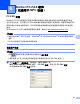
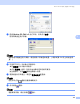
出现
Brother
地址簿
对
话框:
在地址簿中设置成员
6
在
Brother
地址簿
对
话框
中
添
加、
编
辑
或
删除成员
和
组
。
a
在
地
址簿
对
话框
中,点击
图
标
添
加
成员
。
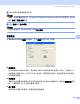
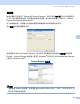
出现
Brother
地址簿成
员设置
对
话框:
b
在
成员
设置对
话框
中
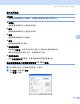
输
入
成员
信息。
姓
名
栏
为
必
填
项
。点击
确定
保
存
信息。
1
...
...
116
117
118
119
120
...
...
227