
Software User's Guide

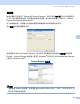


Table Of Contents
- 软件使用说明书 DCP-8070D DCP-8085DN MFC-8370DN MFC-8880DN
- 目录
- Windows®
- 打印
- 扫描
- ControlCenter3
- 网络扫描 (适用于内置网络支持的机型)
- 远程设置 (仅适用于 MFC 机型)
- Brother PC-FAX 软件 (仅适用于 MFC 机型)
- 防火墙设置 (适用于网络用户)
- Apple Macintosh
- 索引
- brother SCHN

103
6
6
PC-FAX 发送 6
Brother PC-FAX 功能使您可以使用计算机将来自应用程序的文档作为标准传真进行发送,
还可以附上封页。您只需在 PC-FAX 地址簿中将接收方设置为成员或组,或者简单地在用户
界面中输入目标地址或传真号。您可以使用地址簿检索功能快速查找传真发送目标成员的
地址。
有关 Brother PC-FAX 功能的最新信息及更新,请访问 http://solutions.brother.com
。
注释
• 使用 Windows
®
2000 专业版、 Windows
®
XP 或 Windows Vista
®
时必须以管理员身份
登录。
• PC-FAX 软件仅可以发送黑白传真文档。
设置用户信息 6
注释
点击 图标即可通过传真发送对话框访问用户信息。
( 请参阅第 106 页上的通过传真类型用户界面将文件作为 PC-FAX 发送。 )
a 点击开始按钮、所有程序、 Brother、 MFC-XXXX ( 或
MFC-XXXX LAN/MFC-XXXX LPT)、 PC-FAX 发送,然后点击 PC-FAX 设置。
出现 Brother PC-FAX 设置对话框:
Brother PC-FAX 软件
( 仅适用于 MFC 机型 )
6