
All in One Printer User Manual

Chapter 7
60
External and extension
telephones 7
Using external and extension
telephones 7
Using extension telephones 7
If you answer a fax call at an extension
telephone, you can make your machine
receive the fax by pressing the Fax Receive
Code l51.
If the machine answers a voice call and
pseudo/double-rings for you to take over, you
can take the call at an extension telephone by
pressing the Telephone Answer Code #51.
(See F/T Ring Time (Fax/Tel mode only)
on page 50.)
Using an external
telephone(Connected to the EXT. jack
of the machine)
7
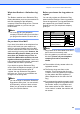
If you answer a fax call at the external
telephone, you can make the machine
receive the fax by pressing Start.
If the machine answers a voice call and
pseudo/double-rings for you to take over, you
can take the call at the external telephone by
pressing Hook.
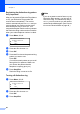
If you answer a call and no one is on
the line:
7
You should assume that you’re receiving a
manual fax.
Press l51 and wait for the chirp or until the
LCD shows Receiving, and then hang up.
Note
You can also use the Easy Receive
feature to make your machine
automatically take the call. (See Easy
Receive on page 51.)
For Fax/Tel mode only 7
When the machine is in Fax/Tel mode, it will
use the F/T Ring Time (pseudo/double-
ringing) to alert you to pick up a voice call.
Lift the external telephone’s handset, and
then press Hook to answer.
If you are at an extension telephone, you will
need to lift the handset during the F/T Ring
Time and then press #51 between the
pseudo/double rings. If no one is on the line,
or if someone wants to send you a fax, send
the call back to the machine by pressing l51.
Connecting an external or
extension telephone 7
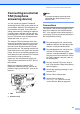
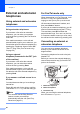
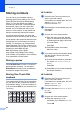
You can connect a separate telephone
directly to your machine as shown in the
diagram below.
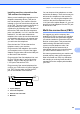
Connect the telephone line cord to the jack
labeled EXT.
Before you connect the external telephone,
remove the protective cap (3) from the EXT.
jack on the machine.
1 Extension telephone
2 External telephone
3 Protective Cap
When you are using the external telephone,
the LCD shows Telephone.
1
2