
All in One Printer User Manual

Chapter 6
52
Additional receiving
operations 6
Printing a reduced incoming
fax 6
If you choose On, the machine automatically
reduces each page of an incoming fax to fit on
one page of A4, Letter, Legal or Folio size
paper.
The machine calculates the reduction ratio by
using the page size of the fax and your Paper
Size setting (Menu, 1, 2, 2).
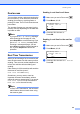
a Make sure you are in Fax mode .
b Press Menu, 2, 1, 5.
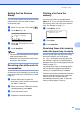
21.Setup Rece ive
5.Auto Redu ction
a On
b Off
Select ab or OK
c Press a or b to choose On or Off.
Press OK.
d Press Stop/Exit.
Duplex (2-sided) printing for
Fax mode 6
Your machine can automatically print
received faxes onto both sides of the paper
when Duplex is set to On.
You can use A4, Letter, Legal or
Folio (8”x13”) size of paper for this function.
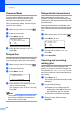
a Make sure you are in Fax mode .
b Press Menu, 2, 1, 9.
21.Setup Receiv e
9.Duplex
a On
b Off
Select ab or OK
c Press a or b to choose On (or Off).
Press OK.
d Press Stop/Exit.
Note
When you turn on Duplex the Auto
Reduction feature is also turned on.