
All in One Printer User Manual

164
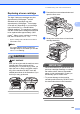
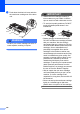
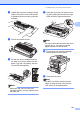
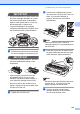
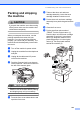
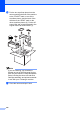
j Put the two styrofoam pieces into the
carton matching the front of the machine
to the “FRONT” mark on one of the
styrofoam pieces, and the back of the
machine to the “REAR” mark on the
other styrofoam pieces (6). Put the AC
power cord and printed materials in the
original carton as shown below (7).
Note
If you are returning your machine to
Brother as part of the Exchange Service,
pack only the machine. Keep all separate
parts, including the drum unit and toner
cartridge assembly, and printed materials
to use with your ‘Exchange’ machine.
k Close the carton and tape it shut.