
All in One Printer User Manual

Troubleshooting and routine maintenance
163
C
Packing and shipping
the machine C
CAUTION
If you pack the machine soon after turning
off the power make sure the machine has
cooled down completely.
When you transport the machine, use the
packing materials that came with your
machine. If you do not pack the machine
properly, you could void your warranty. The
machine should be adequately insured with
the carrier.
a Turn off the machine’s power switch.
b Unplug the machine from the telephone
wall jack.
c Unplug all the cables and AC power
cord from the machine.
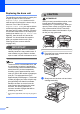
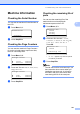
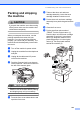
d Push the Scanner Lock Lever down to
lock the scanner. This lever is located on
the left of the scanner glass.
IMPORTANT
Damage caused to your machine by
failure to lock the scanner before packing
and shipping may void your warranty.
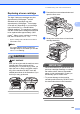
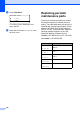
e Press the front cover release button and
open the front cover.
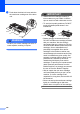
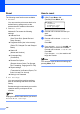
f Take out the drum unit and toner
cartridge assembly. Leave the toner
cartridge installed in the drum unit.
g Put the drum unit and toner cartridge
assembly into a plastic bag and seal the
bag.
h Close the front cover.
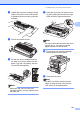
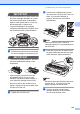
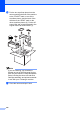
i Put the styrofoam piece marked
“FRONT” into the original carton (1).
Pack the drum unit and toner cartridge
assembly (2) and put it in as shown
below (3). Wrap the machine in the
plastic bag and put it in the original
carton (4). Put the printed material
behind the machine (5).