
All in One Printer User Manual

162
Reset C
The following reset functions are available:
1 Network
You can reset the print server back to its
default factory settings such as the
password and IP address infromation.
2 Address & Fax
Address & Fax resets the following
settings:
Address Book
(One-Touch Dial, Speed-Dial and
Setup Groups)
Programmed fax jobs in the memory
(Polled TX, Delayed Fax and Delayed
Batch)
Station ID
(Name and Number)
Coverpage Msg
(Comments)
Remote Fax Option
(Remote Access Code, Fax Storage,
Fax Forwarding, Paging and PC-Fax)
Report settings
(Transmission Verification Report, Tel
Index List and Fax Journal)
Setting Lock Password
3 All Settings
You can reset all the machine settings
back to the settings that were set at the
factory.
Brother strongly recommends you use this
operation when you dispose of the
machine.
Note
Unplug the interface cable before you choose
Network or All Settings.
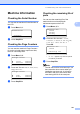
How to reset C
a (USA) Press Menu, 0, 6.
(Canada) Press Menu, 0, 7.
06.Reset
1.Network
2.Address & Fax
3.All Settings
Select ab or OK
b Press a or b to choose the reset you
want.
Press OK.
c Press a or b to choose 1.Reset or
2.Exit.
Press OK.
d If you choose 1.Reset in step c, you
will be asked to reboot the machine.
Press a or b to choose 1.Yes or 2.No.
Press OK.
If you choose 1.Yes, the machine will
begin the Restart.
Note
You can also reset the Nerwork settings by
pressng Menu, 7, 0.