
All in One Printer User Manual

Troubleshooting and routine maintenance
161
C
Machine Information C
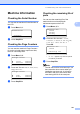
Checking the Serial Number C
You can see the machine’s Serial Number on
the LCD.
a Press Menu, 8, 1.
81.Serial No.
XXXXXXXXX
b Press Stop/Exit.
Checking the Page Counters C
You can see the machine’s Page Counters
for copies, printed pages, reports and lists,
faxes or a summary total.
a Press Menu, 8, 2.
82.Page Count er
a Total :XXXXXX
b Fax/List :XXXXXX
b Press a or b to see Total, Fax/List,
Copy or Print.
82.Page Count er
a Copy :XXXXXX
b Print :XXXXXX
c Press Stop/Exit.
Checking the remaining life of
parts C
You can see the remaining life of the
machine's drum unit and periodic
maintenance parts on the LCD.
a Press Menu, 8, 3.
83.Parts Life
1.Drum
2.Fuser
3.Laser
Select ab or OK
b Press a or b to choose 1.Drum,
2.Fuser, 3.Laser, 4.PF Kit MP,
5.PF Kit 1 or 6.PF Kit 2
1
.
Press OK.
83.Parts Life
1.Drum
Remaining: XX%
1
PF Kit 2 appears only when the optional
LT-5300 tray is installed.
c Press Stop/Exit.
Note
The life check will be accurate only if you
have reset the drum counter when you
installed a new drum unit. It will not be
accurate if that part’s life counter was
reset during the life of the used part.