
User Manual
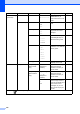
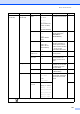


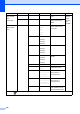
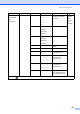
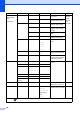

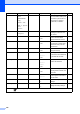
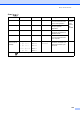
Table Of Contents
- USER’S GUIDE MFC-440CN/MFC-665CW
- Approval Information and Compilation and Publication Notice
- Table of Contents
- Section I:General
- 1 General Information
- 2 Loading documents and paper
- 3 General setup
- 4 Security features
- Section II:Fax
- 5 Sending a fax
- Entering Fax mode
- Broadcasting (Monochrome only)
- Additional sending operations
- Sending faxes using multiple settings
- Contrast
- Changing fax resolution
- Dual access (Monochrome only)
- Real time transmission
- Overseas Mode
- Delayed Faxing (Monochrome only)
- Delayed Batch Transmission (Monochrome only)
- Checking and cancelling waiting jobs
- Setting your changes as a new default
- Restoring all settings to the factory settings
- Sending a fax manually
- Sending a fax at the end of a conversation
- Out of Memory message
- 6 Receiving a Fax
- 7 Telephone Services and External devices
- Voice operations
- Phone line services
- Telephone Service for Australia
- Telephone Service for New Zealand
- Telephone Service for Some Countries
- Connecting an external TAD (telephone answering device)
- External and extension phones
- 8 Dialling and storing numbers
- 9 Digital TAD (MFC-665CW only)
- 10 Advanced fax operations (Monochrome only)
- 11 Printing Reports
- 12 Polling
- 5 Sending a fax
- Section III:Copy
- 13 Making copies
- How to copy
- Copy settings
- ‘Out of Memory’ message
- 13 Making copies
- Section IV:Direct Photo Printing
- Section V:Software
- Section VI:Appendixes
- A:Safety and Legal
- B:Troubleshooting and Routine Maintenance
- Troubleshooting
- Error messages
- Routine maintenance
- Replacing the ink cartridges
- Cleaning the outside of the machine
- Cleaning the scanner
- Cleaning the machine printer platen
- Cleaning the paper pick-up roller
- Cleaning the print head
- Checking the print quality
- Checking the printing alignment
- Checking the ink volume
- Uninstalling the handset and handset cradle (MFC-665CW only)
- Machine Information
- Packing and shipping the machine
- C:Menu and Features
- D:Specifications
- E:Glossary
- Index
- brother ARL/ASA/NZ

166
LAN
(MFC
-665CW
only)
(Continued)
Setup WLAN Setup Wizard — You can configure your
print server.
See
Network
User's
Guide on
the
CD
-
ROM
SecureEasySetup
— You can configure the
wireless network easily.
WLAN Status Status — You can see the current
wireless network status.
Signal — You can see the current
wireless network signal
strength.
SSID — You can see the current
SSID.
Comm. Mode — You can see the current
Communication Mode.
Setup Misc. Wired LAN Auto*
100B-FD
100B-HD
10B-FD
10B-HD
Chooses the Ethernet link
mode.
Network I/F — Wired LAN*
WLAN
You can choose the
network connection type.
Factory Reset — Yes
No
Restores all wired and
wireless network settings
to the factory default.
Print Reports XMIT Verify — — Prints these lists and
reports.
88
Help List ——
Quick-Dial Alphabetical
Order
Numerical
Order
—
Fax Journal ——
User Settings ——
Network
Config
——
Machine Info. Serial No. — — Lets you check the serial
number of your machine.
155
Initial Setup Receive Mode — Fax Only*
Fax/Tel
External TAD
(MFC-440CN
only)
Manual
Choose the receive mode
that best suits your needs.
42
Level1 Level2 Level3 Options Descriptions Page
The factory settings are shown in Bold with an asterisk.