
User Manual
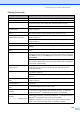
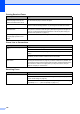

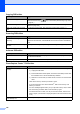
Table Of Contents
- USER’S GUIDE MFC-440CN/MFC-665CW
- Approval Information and Compilation and Publication Notice
- Table of Contents
- Section I:General
- 1 General Information
- 2 Loading documents and paper
- 3 General setup
- 4 Security features
- Section II:Fax
- 5 Sending a fax
- Entering Fax mode
- Broadcasting (Monochrome only)
- Additional sending operations
- Sending faxes using multiple settings
- Contrast
- Changing fax resolution
- Dual access (Monochrome only)
- Real time transmission
- Overseas Mode
- Delayed Faxing (Monochrome only)
- Delayed Batch Transmission (Monochrome only)
- Checking and cancelling waiting jobs
- Setting your changes as a new default
- Restoring all settings to the factory settings
- Sending a fax manually
- Sending a fax at the end of a conversation
- Out of Memory message
- 6 Receiving a Fax
- 7 Telephone Services and External devices
- Voice operations
- Phone line services
- Telephone Service for Australia
- Telephone Service for New Zealand
- Telephone Service for Some Countries
- Connecting an external TAD (telephone answering device)
- External and extension phones
- 8 Dialling and storing numbers
- 9 Digital TAD (MFC-665CW only)
- 10 Advanced fax operations (Monochrome only)
- 11 Printing Reports
- 12 Polling
- 5 Sending a fax
- Section III:Copy
- 13 Making copies
- How to copy
- Copy settings
- ‘Out of Memory’ message
- 13 Making copies
- Section IV:Direct Photo Printing
- Section V:Software
- Section VI:Appendixes
- A:Safety and Legal
- B:Troubleshooting and Routine Maintenance
- Troubleshooting
- Error messages
- Routine maintenance
- Replacing the ink cartridges
- Cleaning the outside of the machine
- Cleaning the scanner
- Cleaning the machine printer platen
- Cleaning the paper pick-up roller
- Cleaning the print head
- Checking the print quality
- Checking the printing alignment
- Checking the ink volume
- Uninstalling the handset and handset cradle (MFC-665CW only)
- Machine Information
- Packing and shipping the machine
- C:Menu and Features
- D:Specifications
- E:Glossary
- Index
- brother ARL/ASA/NZ

Troubleshooting and Routine Maintenance
137
Sending Faxes
Difficulty Suggestions
Cannot send a fax. Check all line cord connections.
Make sure that the Fax key is illuminated. (See Entering Fax mode on
page 34.)
Ask the other party to check that the receiving machine has paper.
Print the Transmission Verification Report and check for an error. (See Reports on
page 88.)
Transmission Verification Report
says ‘Result:ERROR’.
There is probably temporary noise or static on the line. Try sending the fax again.
If you send a PC FAX message and get
‘Result:NG’ on the Transmission
Verification Report, your machine may be out of memory. To gain extra memory,
you can turn off Advanced Fax Operation (see Turning off Advanced Fax
Operations on page 81), print fax messages in memory (see Printing a fax from
the memory on page 48) or cancel a Delayed Fax or Polling Job (see Cancelling
a fax in progress on page 35). If the problem continues, ask the telephone
company to check your phone line.
If you often get transmission errors due to possible interference on the phone line,
try changing the menu setting of Compatibility to Basic. (See Compatibility on
page 147.)
Poor fax send quality. Try changing your resolution to Fine or S.Fine. Make a copy to check your
machine's scanner operation. If the copy quality is not good, clean the scanner.
(See Cleaning the scanner on page 150.)
Vertical black lines when sending. If the copy you made shows the same problem, clean the scanner. (See Cleaning
the scanner on page 150.)
Handling Incoming Calls
Difficulty Suggestions
The machine ‘Hears’ a voice as a
CNG Tone.
If Fax Detect is set to on, your machine is more sensitive to sounds. It may
mistakenly interpret certain voices or music on the line as a fax machine calling
and respond with fax receiving tones. Deactivate the machine by pressing
Stop/Exit. Try avoiding this problem by turning Fax Detect to off. (See Fax Detect
on page 46.)
Sending a fax call to the machine. If you answered on an external or extension phone, press your Fax Receive Code
(the factory setting is l 5 1 (l 9 1 for New Zealand)). When your machine
answers, hang up.
Custom features on a single line. If you have Call Waiting, Call Waiting/Caller ID, an alarm system EFTPOS,
PC/FAX modem or other custom feature on a single phone line with your machine,
it may create a problem sending or receiving faxes.
For example: If you subscribe to Call Waiting or some other custom service and
its signal comes through the line while your machine is sending or receiving a fax,
the signal can temporarily interrupt or disrupt the faxes. Brother's ECM feature
should help overcome this problem. This condition is related to the telephone
system industry and is common to all devices that send and receive information
on a single, shared line with custom features. If avoiding a slight interruption is
crucial to your business, a separate phone line with no custom features is
recommended.