
Software User's Guide
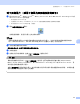
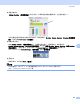
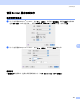
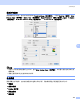
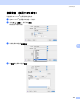
Table Of Contents
- 软件使用说明书
- 目录
- 第I部分 Windows®
- 第II部分 Apple® Macintosh®
- 索引
- Brother CHN

打印和传真
100
8
更新设备状态
Status Monitor (状态监控器)窗口打开时,如果希望查看设备最新状态,点击更新按钮 (1)。
您可设置软件更新设备状态信息的时间间隔。 转到菜单栏,Brother Status Monitor (Brother 状态监控
器),然后选择 Preferences (首选项)。
隐藏或显示窗口
启动 Status Monitor (状态监控器)后,可隐藏或显示窗口。 要隐藏窗口,转到菜单栏,
Brother Status Monitor(Brother 状态监控器)然后选择隐藏 Brother Status Monitor(隐藏 Brother
状态监控器)。 要显示窗口,点击工具栏上的 Status Monitor (状态监控器)图标或点击
ControlCenter2 上 DeviceSettings (设备设定)栏中的墨水余量。
退出窗口
转到菜单栏,然后选择 Quit (退出)。
注释
对于网络用户,Mac OS
®
X 10.4或更高版本的 Status Monitor Widget 同样可以从
http://solutions.brother.com
上下载。
1