
Operation Manual






Menu and Features
163
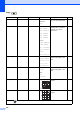
Color Enhance On
Off*
White Balance
Adjusts the hue of the white
areas.
103
Sharpness
Enhances the detail of the
image.
Color Density
Adjusts the total amount of
colour in the image.
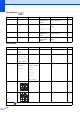
Cropping On*
Off
— — Crops the image around the
margin to fit the paper size
or print size. Turn this
feature off if you want to
print whole images or
prevent unwanted
cropping.
103
Borderless On*
Off
— — Expands the printable area
to fit the edges of the paper.
104
Set New
Default
Yes
No
— — You can save your print
settings.
104
Factory Reset Yes
No
— — You can restore all the
settings to factory settings.
104
Option1 Option2 Option3 Option4 Descriptions Page
The factory settings are shown in Bold with an asterisk.
+2
+1
-1
-2
+2
+1
-1
-2
+2
+1
-1
-2