
Network User's Guide



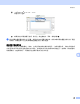

Table Of Contents

从 Macintosh
®
进行网络打印
86
9
更改打印服务器设置 9
使用远程设置更改配置
(DCP 型号不可用) 9
可在 Macintosh
®
中使用远程设置应用程序更改打印机或打印服务器参数。请参见第 12 页上的使用远程设置
更改打印服务器设置 (适用于 Windows
®
和 Mac OS
®
X 10.2.4 或更高版本) (DCP 型号不可用)。
使用 BRAdmin Light 实用程序更改打印服务器设置 9
Brother BRAdmin Light 实用程序是一种专为 Mac OSX 10.2.4 或更高版本环境设计的 Java应用程序。BRAdmin
Light 允许您在 Brother 标配网络设备上更改网络设置。
注释
• 请使用 Brother 产品随机光盘内所提供的 BRAdmin Light 实用程序。您也可以从 Brother 网站
http://solutions.brother.com
下载最新版的 Brother BRAdmin Light 实用程序。此程序仅适用于
Macintosh
®
用户。
• 节点名:节点名出现在当前的 BRAdmin Light 中。对于有线网络的默认节点名为 BRN_xxxxxx 或对于无线网
络的默认节点名为 BRW_xxxxxx (xxxxxx 是以太网地址的最后六位数字)。
a 要启动 BRAdmin Light 实用程序,请双击桌面上的 Macintosh HD 图标,然后点击 Library (资源库)/
Printers (打印机) / Brother / Utilities (实用程序)。然后,双击 BRAdminLight.jar 文件。
b 选择您所需要的打印服务器,更改设置。
c 从 Control (控制)菜单中选择 Configure Print Server (配置打印服务器)。
d 输入您设置的密码。现在您可以更改打印服务器设置。
其他信息来源 9
a 欢迎登录 http://solutions.brother.com 获取更多关于网络打印的信息。
b 请参见第 10 页上的设置 IP 地址和子网掩码了解如何配置打印机 IP 地址。