
User Guide






3 - 7 ON-SCREEN PROGRAMMING
Main Menu Submenu Menu
Selections
Options Descriptions Page
2.Fax
(Continued)
1.Setup
Receive
(In Fax mode
only)
(Continued)
3.Fax Detect On
Off
Receives fax
messages without
pressing the Start
key.
5-4
4.Remote
Code
On
( 51, #51)
Off
You can answer all
calls at an extension
or external phone
and use codes to turn
the MFC on or off.
You can personalize
these codes.
5-9
5.Auto
Reduction
On
Off
Reduces the size of
incoming faxes.
5-5
6.Memory
Receive
On
Off
Automatically stores
any incoming faxes
in its memory if it runs
out of paper.
5-6
7.Print
Density
- +
- +
- +
- +
- +
Makes printouts
darker or lighter.
5-7
8.Polling RX Standard
Secure
Timer
Sets up your MFC to
poll another fax
machine.
5-10
9.Duplex
(MFC-8820D)
On
Off
Receives faxes
printed on both sides
of the paper.
5-13
The factory settings are shown in Bold with .
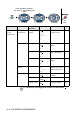
to accept
to
exit
Press the Menu numbers.
(ex. Press 1, 1 for Mode Timer)
—
OR
—
to select to select