User Guide
Manuals
Brands
Brother Manuals
All in One Printer
MFC-8420
311
312
313
314
315
316
317
318
319
320
18 -
10
USI
NG YOUR
MFC WIT
H A MACI
NTOSH
®
7
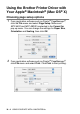
Enter your MFC na
me (MFC-8820D)
, and then click
Sa
ve
.
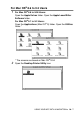
8
Sel
ect
Qui
t
from
the
File
m
enu
.
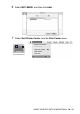
9
Click the
MFC-
88
20D
ic
o
n on
th
e Des
kt
op
.
10
Sel
ect
Set Default Printer
fro
m
th
e
Pr
i
nti
n
g
me
nu.
1
...
...
315
316
317
318
319
...
...
427