
User Guide



10 - 16 MAKING COPIES
Poster
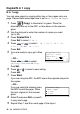
You can make a poster
size copy of a
photograph. You must
use the scanner glass.
1
Place the original face down on the scanner glass.
2
Press
Duplex/N in 1
and or to select Poster.
Press
Set
.
3
Press
Start
.
The MFC starts scanning the original and prints the pages for
the poster.
For Poster copies, you cannot make more than one copy or use
the Enlarge/Reduce setting.