
Quick Start Manual




49
0
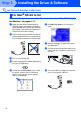
Open the Utilities folder.
A
Open the Print Center icon.
B
Click the Add Printer... button.
C
Select AppleTalk.
D
Select BRN_xxxxxx_P1, and then click the
Add button.
E
Select Quit Printer Center from the Printer
Center menu.
The setup is now complete.
xxxxxx are the last six digits of the Ethernet
address.
Network User's Guide Chapter 7 on the
CD-ROM.
For users of Mac
®
OS 10.2.1 or greater
Please visit http://solutions.brother.com/ for
information about using Rendezvous.
Installing the Driver & Software
Setting Up
the Machine
For
Administrators
Macintosh
®
Network