
Quick Start Manual




48
Installing the Driver & Software
Make sure that you have completed the instructions from Step 1 “Setting Up
the Machine” on pages 4 - 11.
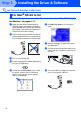
1
Make sure that the NC-9100h (Network
Print/Fax Server) is installed into the MFC
(MFC-8820DN has the NC-9100h installed
as standard). (See "Optional accessories" in
Chapter 23 of the User's Guide.)
2
Switch off and unplug the MFC from the AC
outlet and disconnect it from your Macintosh
if you already connected an interface cable.
3
Turn on your Macintosh
®
.
4
Insert the supplied CD-ROM for Macintosh
®
into your CD-ROM drive.
5
Double-click the Start Here OS X folder to
install the printer driver and Remote Setup
program. If the language screen appears,
select your language.
6
Click MFL-Pro Suite to install.
7
Connect the network interface cable to the
printer, and then connect it to a free port on
your hub.
8
Turn on the MFC by plugging in the power
cord. Turn the power switch on.
9
Select Applications from the Go menu.
For Network Interface Cable Users
For Mac
®
OS X 10.1/10.2.1 or greater
Step 2