
Quick Start Manual




45
0
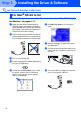
Open the Printer Center icon.
A
Click Add Printer....
B
Select USB.
C
Select your machine, and then click Add.
D
Select Quit Printer Center from the Printer
Center menu.
The Brother Printer driver, Scanner
driver, Brother PC-FAX Send and
Remote Setup Program have been
installed and the installation is now
complete.
E
To install Presto! PageManager
®
, click the
Presto! PageManager
®
icon and follow on
the Screen instructions.
Presto! PageManager
®
has been
installed and the installation is now
complete.
You can easily scan, share and organize
photos and documents using Presto!
PageManager
®
.
Installing the Driver & Software
Setting Up
the Machine
For
Administrators
Macintosh
®
USB