
Multifunction Printer User's Guide


Menu and features
167
D
1.General Setup
(continued)
4.Daylight Save
— On
Off*
Changes for Daylight
Savings Time
manually.
25
5.Ecology 1.Toner Save On
Off*
Increases the page
yield of the toner
cartridge.
25
2.Sleep Time Range varies
depending on
model.
005Min*
Conserves power. 25
6.Tray Use 1.Copy Tray#1 Only
Tray#2 Only
MP Only
MP>T1>T2*
T1>T2>MP
(For
MFC-8380DN,
tray#2 or T2
appears only if
you installed the
optional paper
tray.)
Selects the tray that
will be used for Copy
mode.
22
2.Fax Tray#1 Only
Tray#2 Only
MP Only
MP>T1>T2
T1>T2>MP*
(For
MFC-8380DN,
tray#2 or T2
appears only if
you installed the
optional paper
tray.)
Selects the tray that
will be used for Fax
mode.
23
3.Print Tray#1 Only
Tray#2 Only
MP Only
MP>T1>T2*
T1>T2>MP
(For
MFC-8380DN,
tray#2 or T2
appears only if
you installed the
optional paper
tray.)
Selects the tray that
will be used for PC
print.
23
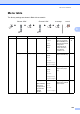
Main Menu Submenu Menu Selections Options Descriptions Page