
User`s guide



186
Scan ( )
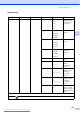
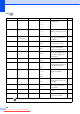
Level1 Option1 Option2 Option3 Descriptions Page
Scan to E-mail
— — — You can scan a monochrome
or a colour document into your
E-mail application.
See
Software
User's
Guide
on the
CD
-
ROM
Scan to Image — — — You can scan a colour picture
into your graphics application.
Scan to OCR — — — You can have your text
document converted to an
editable text file.
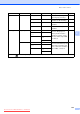
Scan to File — — — You can scan a monochrome
or a colour document into your
computer.
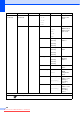
Scan to Media
(when a memory
card or USB
Flash memory
drive is inserted)
Quality —
Color 150 dpi
*
Color 300 dpi
Color 600 dpi
B/W 200x100 dpi
B/W 200 dpi
You can choose the scan
resolution, file format for your
document.
113
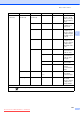
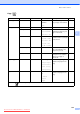
File Type — (If you chose
colour option in
Quality setting)
PDF*
JPEG
(If you chose
Mono option in
Quality setting)
PDF*
TIFF
File Name — — You can rename the file.
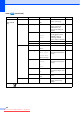
Set New Default
— Yes
No
You can save your scan
settings.
114
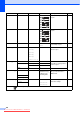
Factory Reset — Yes
No
You can restore all settings to
the factory settings.
114
The factory settings are shown in Bold with an asterisk.
Downloaded from ManualsPrinter.com Manuals