
User`s guide



Menu and Features
183
C
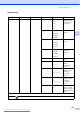
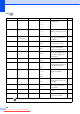
Print Reports XMIT Verify — — Prints these lists and
reports.
83
Help List ——
Quick Dial — Alphabetical
Order
Numerical Order
Fax Journal ——
User Settings ——
Network Config
——
Caller ID hist.
——
Machine Info. Serial No. — — Lets you check the serial
number of your machine.
169
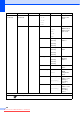
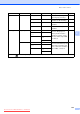
Initial Setup Receive Mode
(MFC-790CW
only)
— Fax Only*
Fax/Tel
Manual
Choose the receive mode
that best suits your needs.
43
Receive Mode
(MFC-990CW
only)
— Fax Only
Fax/Tel*
Manual
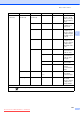
Date&Time — — Puts the date and time on
the LCD and in headings
of faxes you send.
See
Quick
Setup
Guide
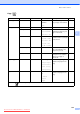
Station ID — Fax:
Name:
Set your name and fax
number to appear on each
page you fax.
Tone/Pulse
(Not available in
New Zealand)
— Tone*
Pulse
Choose the dialling mode.
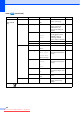
Dial Tone — Detection
No Detection*
Turns Dial Tone Detection
on or off.
149
Register Handset
(MFC-990CW
only)
— Register
Terminate
Sets the machine to
register the cordless
handset.
See
DECT™
Handset
BCL-D70
User’s
Guide
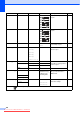
Level1 Level2 Level3 Options Descriptions Page
The factory settings are shown in Bold with an asterisk.
Downloaded from ManualsPrinter.com Manuals