
User`s guide



182
MENU ( ) (continued)
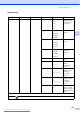
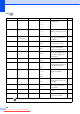
Level1 Level2 Level3 Options Descriptions Page
Bluetooth
(MFC-990CW
only)
Turn On/Off — On
Off*
Turn on to use Bluetooth
®
wireless technology.
121
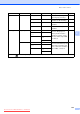
Settings Pass Key —
Authorizes a Bluetooth
®
wireless technology
enabled device to
communicate with your
machine
121
Comm. Mode Public*
Private
Secure
Controls the level of
security between other
Bluetooth
®
wireless
technology enabled
devices and your machine
121
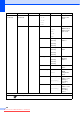
Device Address
— Identifies your machine 122
Device Name — Name of your machine. 122
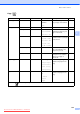
Print Settings Print Quality
Normal
Photo*
Choose the print quality. 122
Paper Type Plain Paper
Inkjet Paper
Brother BP71
Other Glossy*
Choose the paper type
that matches the paper in
the tray.
122
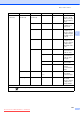
Paper Size 10x15cm*
13x18cm
A4
Letter
Choose the paper size
that matches the paper in
the tray.
123
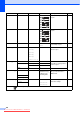
Borderless On*
Off
Expands the printable
area to fit the edges of the
paper.
123
Date Print On
Off*
Prints the date on your
photos.
123
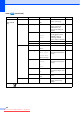
Factory Reset — Yes
No
You can restore all
settings to the factory
settings.
123
The factory settings are shown in Bold with an asterisk.
MENU
Downloaded from ManualsPrinter.com Manuals