
User`s guide


Printing photos from a memory card or USB Flash memory drive
107
13
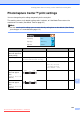
PhotoCapture Center™ print settings 13
You can change the print settings temporarily for the next print.
The machine returns to its default settings after 3 minutes, or if the Mode Timer returns the
machine to Fax mode. (See Mode Timer on page 25.)
Note
You can save the print settings you use most often by setting them as the default. (See Setting
your changes as a new default on page 112.)
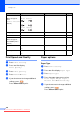
Menu Selections Options 1 Options 2 Page
Print Quality
(Does not appear for
DPOF printing)
Normal/Photo — 108
Paper Type Plain Paper/Inkjet Paper/
Brother BP71/Other Glossy
— 108
Paper Size 10x15cm/13x18cm/A4/Letter (When A4 or Letter is chosen)
8x10cm/ 9x13cm/
10x15cm/13x18cm/
15x20cm/Max. Size
109
Brightness
(Does not appear
when
Enhance Photos is
chosen.)
— 109
Contrast
(Does not appear
when
Enhance Photos is
chosen.)
— 109
Print Setting
Print Setting
PhotoPrint Quality
Other GlossyPaper Type
10x15cmPaper Size
0
Dark Light
0
Downloaded from ManualsPrinter.com Manuals