
Printer/Fax/Scanner/Copier Quick Setup Guide
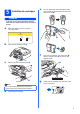
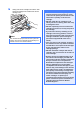
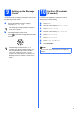
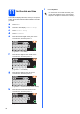
Table Of Contents
- Quick Setup Guide MFC-790CW MFC-990CW
- Start Here
- 1 Unpack the machine and check the components
- 2 Connect the handset (MFC-790CW only)
- 3 Load plain Letter/A4 paper
- 4 Connect the power cord and telephone line
- 5 Install the ink cartridges
- 6 Check the print quality
- 7 Choose your language (If needed)
- 8 Choose the correct Receive Mode
- 9 Setting up the Message Center
- 10 Set the LCD contrast (If needed)
- 11 Set the date and time
- 12 Set your station ID
- 13 Set tone or pulse dialing mode
- 14 Automatic Daylight Savings Time
- 15 Send in the Product Registration and Test Sheet (USA only)
- Set up the cordless handset (MFC-990CW only)
- For USB Interface Users (For Windows® 2000 Professional/XP/XP Professional x64 Edition/ Windows Vista®)
- For USB Interface Users (For Mac OS® X 10.2.4 or greater)
- For Wired Network Interface Users (For Windows® 2000 Professional/XP/XP Professional x64 Edition/ Windows Vista®)
- For Wired Network Interface Users (For Mac OS® X 10.2.4 or greater)
- For Wireless Network Interface Users
- 23 Before you begin
- 24 Confirm your network environment (Infrastructure Mode)
- Connecting the Brother machine to the wireless network
- Install the Drivers & Software (For Windows® 2000 Professional/XP/XP Professional x64 Edition/ Windows Vista®)
- Install the Drivers & Software (For Mac OS® X 10.2.4 or greater)
- Install Optional Applications Windows®
- For Network Users
- Consumables
- brother USA/CAN
- Start Here

6
h
Gently push the ink cartridge until it clicks. After
all the ink cartridges are installed close the ink
cartridge cover.
Note
The machine will prepare the ink tube system for
printing. This process will take approximately four
minutes. Do not turn off the machine.
Important
• DO NOT take out ink cartridges if you do not
need to replace them. If you do so, it may
reduce the ink quantity and the machine will
not know the quantity of ink left in the
cartridge.
• DO NOT shake the ink cartridges. If ink
stains your skin or clothing, wash with soap
or detergent at once.
• DO NOT repeatedly insert and remove the
cartridges. If you do so, ink may seep out of
the cartridge.
• If you mix the colors by installing an ink
cartridge in the wrong position, clean the
print head several times after correcting the
cartridge installation. (See Cleaning the
print head in Appendix B of the User’s
Guide.)
• Once you open an ink cartridge, install it in
the machine and use it up within six months
of installation. Use unopened ink cartridges
by the expiration date written on the
cartridge package.
• DO NOT dismantle or tamper with the ink
cartridge, this can cause the ink to leak out
of the cartridge.
• Brother strongly recommends that you do
not refill the ink cartridges provided with
your machine. We also strongly recommend
that you continue to use only Genuine
Brother Brand replacement ink cartridges.
Using or attempting to use potentially
incompatible inks and/or cartridges in your
machine may cause damage to the machine
itself and/or it may result in unsatisfactory
print quality. Our warranty coverage does
not apply to any problem that was caused by
the use of unauthorized third party ink
and/or cartridges. To protect your
investment and guarantee your print quality
please continue to replace consumed ink
cartridges with only Genuine Brother
Branded Supplies.