
User Manual
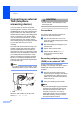
Table Of Contents
- USER’S GUIDE MFC-790CW
- Approval Information and Compilation and Publication Notice
- Table of Contents
- Section I General
- 1 General Information
- 2 Loading paper and documents
- 3 General setup
- 4 Security features
- Section II Fax
- 5 Sending a Fax
- Entering Fax mode
- Broadcasting (Monochrome only)
- Additional sending operations
- Sending faxes using multiple settings
- Contrast
- Changing fax resolution
- Dual access (Monochrome only)
- Real time transmission
- Overseas Mode
- Delayed Faxing (Monochrome only)
- Delayed Batch Transmission (Monochrome only)
- Checking and cancelling waiting jobs
- Setting your changes as a new default
- Restoring all settings to the factory settings
- Sending a fax manually
- Sending a fax at the end of a conversation
- Out of Memory message
- 6 Receiving a Fax
- 7 Telephone and External devices
- 8 Dialling and storing numbers
- 9 Digital TAD
- 10 Printing Reports
- 11 Polling
- 5 Sending a Fax
- Section III Copy
- Section IV Direct Photo Printing
- Section V Software
- Section VI Appendixes
- A Safety and Legal
- B Troubleshooting and Routine Maintenance
- Troubleshooting
- Error and Maintenance messages
- Routine maintenance
- Replacing the ink cartridges
- Cleaning the outside of the machine
- Cleaning the scanner glass
- Cleaning the machine’s printer platen
- Cleaning the paper pick-up roller
- Cleaning the print head
- Checking the print quality
- Checking the print alignment
- Checking the ink volume
- Uninstalling and installing the handset and handset cradle
- Machine Information
- Packing and shipping the machine
- C Menu and Features
- D Specifications
- E Glossary
- Index
- brother CHN-ENG

Chapter 7
62
Connecting an external
TAD (telephone
answering device) 7
You may choose to connect an external
answering device. However, when you have
an external TAD on the same telephone line
as the machine, the TAD answers all calls
and the machine ‘listens’ for fax calling (CNG)
tones. If it hears them, the machine takes
over the call and receives the fax. If it does
not hear CNG tones, the machine lets the
TAD continue playing your outgoing message
so your caller can leave you a voice
message.
The TAD must answer within two rings. The
machine cannot hear CNG tones until the
TAD has answered the call, and with four
rings there are only 8 to 10 seconds of CNG
tones left for the fax ‘handshake’. Make sure
you carefully follow the instructions in this
guide for recording your outgoing message.
We do not recommend using the toll saver
feature on your external answering machine if
it exceeds five rings.
Note
If you do not receive all your faxes, cut the
Ring Delay setting on your external TAD.
1TAD
When the TAD answers a call, the LCD
shows Ext. Tel in Use.
CAUTION
Do not connect a TAD elsewhere on the
same phone line.
Connections 7
The external TAD must be connected as
shown in the previous illustration.
a Set your external TAD to one or two
rings. (The machine's Ring Delay setting
does not apply.)
b Record the outgoing message on your
external TAD.
c Set the TAD to answer calls.
d Set the Receive Mode to Manual.
(See Choose the Receive Mode
on page 43.)
Recording outgoing message
(OGM) on an external TAD 7
Timing is important in recording this
message. The message sets up the ways to
handle both manual and automatic fax
reception.
a Record 5 seconds of silence at the
beginning of your message. (This allows
your machine time to listen for the fax
CNG tones of automatic transmissions
before they stop.)
b Limit your speaking to 20 seconds.
Note
We recommend beginning your OGM with
an initial 5-second silence because the
machine cannot hear fax tones over a
resonant or loud voice. You may try
omitting this pause, but if your machine
has trouble receiving, then you must re-
record the OGM to include it.
1
1
EXT.
EXT.
LINE
LINE