
Network User's Guide for Internet Fax

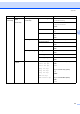
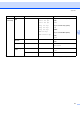
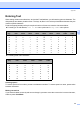

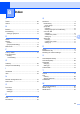
Table Of Contents
- NETWORK USER’S GUIDE MFC-7440N MFC-7840N MFC-7840W
- Table of Contents
- 1 Internet fax
- Overview
- Getting connected
- Control panel key functions
- Sending an Internet fax
- Manually entering text
- Receiving E-mail or Internet fax
- Receiving an Internet fax to your computer
- Forwarding received E-mail and fax messages
- Relay broadcasting
- TX Verification Mail
- Setup Mail TX
- Setup Mail RX
- Error mail
- Important information on Internet fax
- Overview
- 2 Fax operation
- 3 Control panel setup
- LAN menu
- TCP/IP
- Ethernet (wired network only)
- Setup Wizard (MFC-7840W wireless network only)
- SES/WPS/AOSS (MFC-7840W wireless network only)
- WPS w/PIN Code (MFC-7840W wireless network only)
- WLAN Status (MFC-7840W wireless network only)
- Set to Default (MFC-7840W only)
- Wired Enable (MFC-7840W wired network only)
- WLAN Enable (MFC-7840W wireless network only)
- Setup Internet (from the Setup IFAX menu)
- Setup Mail RX (from the Setup IFAX menu)
- Setup Mail TX (from the Setup IFAX menu)
- Setup Relay (from the Setup IFAX menu)
- Scan to E-mail (E-mail server)
- Scan to FTP
- Fax to Server
- Time Zone
- Restoring the network settings to factory default
- Printing the Network Configuration List
- LAN menu
- Appendix A
- Index

Index
60
B
B
A
AOSS ........................................................................ 26
APIPA
....................................................................... 24
B
BOOTP ..................................................................... 17
Broadcasting
............................................................. 13
setting up groups for
.............................................. 14
D
DHCP ........................................................................ 18
Dialing
a pause
.................................................................... 9
groups (broadcasting)
............................................ 13
DNS server
............................................................... 23
F
Factory default .......................................................... 47
Fax, stand-alone
sending
broadcasting
....................................................... 13
G
Gateway .................................................................... 20
Groups for broadcasting
........................................... 14
I
IP address ................................................................. 19
IPv6
........................................................................... 24
N
Network Configuration List ........................................ 47
Node name
............................................................... 21
O
One touch
changing
................................................................ 12
setting up
................................................................. 9
P
PBC ........................................................................... 26
PIN Method
............................................................... 26
Q
Quick dial .................................................................... 9
broadcasting
.......................................................... 13
using groups
....................................................... 13
group dial
changing
............................................................. 12
setting up groups for broadcasting
..................... 14
one touch dial
changing
............................................................. 12
custom scan profile
............................................... 9
setting up
.............................................................. 9
speed dial
changing
............................................................. 12
custom scan profile
............................................. 11
setting up
............................................................ 11
R
RARP ........................................................................ 17
Redial/Pause key
........................................................ 9
Restoring the network settings
.................................. 47
S
Search/Speed Dial key ............................................. 14
SecureEasySetup
..................................................... 26
Speed dial
changing
................................................................ 12
setting up
............................................................... 11
Subnet mask
............................................................. 19
T
TCP/IP ...................................................................... 16
Text
entering
.................................................................. 58
special characters
.................................................. 59
Trademarks
.................................................................. i
W
Wi-Fi Protected Setup ............................................... 26
WINS Config
............................................................. 21
WINS Server
............................................................. 22