
Network User's Guide for Internet Fax

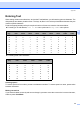

Table Of Contents
- NETWORK USER’S GUIDE MFC-7440N MFC-7840N MFC-7840W
- Table of Contents
- 1 Internet fax
- Overview
- Getting connected
- Control panel key functions
- Sending an Internet fax
- Manually entering text
- Receiving E-mail or Internet fax
- Receiving an Internet fax to your computer
- Forwarding received E-mail and fax messages
- Relay broadcasting
- TX Verification Mail
- Setup Mail TX
- Setup Mail RX
- Error mail
- Important information on Internet fax
- Overview
- 2 Fax operation
- 3 Control panel setup
- LAN menu
- TCP/IP
- Ethernet (wired network only)
- Setup Wizard (MFC-7840W wireless network only)
- SES/WPS/AOSS (MFC-7840W wireless network only)
- WPS w/PIN Code (MFC-7840W wireless network only)
- WLAN Status (MFC-7840W wireless network only)
- Set to Default (MFC-7840W only)
- Wired Enable (MFC-7840W wired network only)
- WLAN Enable (MFC-7840W wireless network only)
- Setup Internet (from the Setup IFAX menu)
- Setup Mail RX (from the Setup IFAX menu)
- Setup Mail TX (from the Setup IFAX menu)
- Setup Relay (from the Setup IFAX menu)
- Scan to E-mail (E-mail server)
- Scan to FTP
- Fax to Server
- Time Zone
- Restoring the network settings to factory default
- Printing the Network Configuration List
- LAN menu
- Appendix A
- Index

Appendix
58
A
Entering Text A
When setting certain menu selections, such as the E-mail address, you will need to type text characters. The
dial pad keys have letters printed on them. The keys: 0, # and l do not have printed letters because they are
used for special characters.
Press the appropriate dial pad key the required number of times to access the characters below:
For setting an E-mail address, Scan to FTP menu options and Setup IFAX menu options
For setting other menu selections
Inserting spaces
A
To enter a space in a fax number, press c once between numbers. To enter a space in a name, press c twice
between characters.
Making corrections
A
If you entered a letter incorrectly and want to change it, press d to move the cursor to the incorrect character,
and then press Clear/Back.
Press
Key
one
time
two
times
three
times
four
times
five
times
six
times
seven
times
eight
times
nine
times
1 @. / 1@. / 1@
2 abcABC2ab
3 defDEF3de
4 ghiGHI4gh
5 jklJKL5jk
6 mnoMNO6mn
7 pqr sPQRS7
8 tuvTUV8tu
9 wxyzWXYZ9
Press
Key
one
time
two
times
three
times
four
times
five
times
2 ABC2A
3 DEF3D
4 GH I 4G
5 JKL5J
6 MNO6M
7 PQRS7
8 TUV8T
9 WXYZ 9