
Network User's Guide for Internet Fax
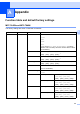
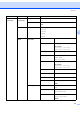
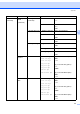
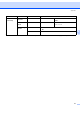

Table Of Contents
- NETWORK USER’S GUIDE MFC-7440N MFC-7840N MFC-7840W
- Table of Contents
- 1 Internet fax
- Overview
- Getting connected
- Control panel key functions
- Sending an Internet fax
- Manually entering text
- Receiving E-mail or Internet fax
- Receiving an Internet fax to your computer
- Forwarding received E-mail and fax messages
- Relay broadcasting
- TX Verification Mail
- Setup Mail TX
- Setup Mail RX
- Error mail
- Important information on Internet fax
- Overview
- 2 Fax operation
- 3 Control panel setup
- LAN menu
- TCP/IP
- Ethernet (wired network only)
- Setup Wizard (MFC-7840W wireless network only)
- SES/WPS/AOSS (MFC-7840W wireless network only)
- WPS w/PIN Code (MFC-7840W wireless network only)
- WLAN Status (MFC-7840W wireless network only)
- Set to Default (MFC-7840W only)
- Wired Enable (MFC-7840W wired network only)
- WLAN Enable (MFC-7840W wireless network only)
- Setup Internet (from the Setup IFAX menu)
- Setup Mail RX (from the Setup IFAX menu)
- Setup Mail TX (from the Setup IFAX menu)
- Setup Relay (from the Setup IFAX menu)
- Scan to E-mail (E-mail server)
- Scan to FTP
- Fax to Server
- Time Zone
- Restoring the network settings to factory default
- Printing the Network Configuration List
- LAN menu
- Appendix A
- Index

48
A
A
Function table and default factory settings A
MFC-7440N and MFC-7840N A
The factory settings are shown in Bold with an asterisk.
Appendix A
Main menu Submenu Menu selections Options
4.LAN 1.TCP/IP 1.BOOT Method Auto*
Static
RARP
BOOTP
DHCP
(If you choose Auto, RARP, BOOTP or DHCP, you will be
asked to enter how many times the machine tries to obtain
the IP address.)
2.IP Address [000-255].[000-255].[000-255].[000-255]
[000].[000].[000].[000]*
1
3.Subnet Mask [000-255].[000-255].[000-255].[000-255]
[000].[000].[000].[000]*
1
4.Gateway [000-255].[000-255].[000-255].[000-255]
[000].[000].[000].[000]*
5.Node Name BRNxxxxxxxxxxxx
(up to 15 characters)
6.WINS Config Auto*
Static
7.WINS Server Primary [000-255].[000-255].
[000-255].[000-255]
[000].[000].[000].[000]*
Secondary [000-255].[000-255].
[000-255].[000-255]
[000].[000].[000].[000]*
8.DNS Server Primary [000-255].[000-255].
[000-255].[000-255]
[000].[000].[000].[000]*
Secondary [000-255].[000-255].
[000-255].[000-255]
[000].[000].[000].[000]*