
User Manual
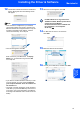

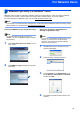
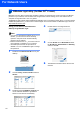
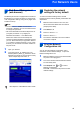
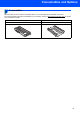


Table Of Contents
- Quick Setup Guide MFC-7840W
- Symbols used in this guide
- Table of Contents
- Getting Started
- STEP 1 Setting Up the Machine
- STEP 2 Installing the Driver & Software
- Supplied CD-ROM ‘MFL-Pro Suite’
- Windows®
- For USB Interface Cable Users (For Windows® 2000 Professional/XP/XP Professional x64 Edition/Windows Vista®)
- For Wired Network Interface Users (For Windows® 2000 Professional/XP/XP Professional x64 Edition/Windows Vista®)
- For Wireless Network Interface Users (For Windows® 2000 Professional/XP/XP Professional x64 Edition/Windows Vista®) in infrastructure mode
- Connecting your wireless machine and wireless network together and installing the printer driver in infrastructure mode
- Using the Setup Wizard from the control panel LAN menu for wireless network configuration
- Using the SecureEasySetup™, Wi-Fi Protected Setup™ or AOSS™ software to configure your machine for a wireless network (one-push method)
- Macintosh®
- For USB Interface Cable Users
- For Wired Network Interface Users
- For Wireless Network Interface Users (For Mac OS® X 10.2.4 or greater) in infrastructure mode
- Connecting your wireless machine and wireless network together and installing the printer driver in infrastructure mode
- Using the Setup Wizard from the control panel LAN menu for wireless network configuration (Infrastructure Mode)
- Using the SecureEasySetup™, Wi-Fi Protected Setup™ or AOSS™ software to configure your machine for a wireless network (one push-mode)
- For Network Users
- Consumables and Options
- brother UK/IRE/SAF

Trademarks
The Brother logo is a registered trademark of Brother Industries, Ltd.
Brother is a registered trademark of Brother Industries, Ltd.
Multi-Function Link is a registered trademark of Brother International Corporation.
Windows Vista is either a registered trademark or a trademark of Microsoft Corporation in the United States and other
countries.
Microsoft, Windows and Windows Server are registered trademarks of Microsoft Corporation in the United States and/or other
countries.
Macintosh and TrueType are registered trademarks of Apple Inc.
Nuance, the Nuance logo, PaperPort and ScanSoft are trademarks or registered trademarks of Nuance Communications, Inc.
or its affiliates in the United States and / or other countries.
Presto! PageManager is a registered trademark of NewSoft Technology Corporation.
BROADCOM, SecureEasySetup and the SecureEasySetup logo are trademarks or registered trademarks of Broadcom
Corporation.
AOSS is a trademark of Buffalo Inc.
Wi-Fi, WPA and WPA2 are registered trademarks and Wi-Fi Protected Setup is a trademark of Wi-Fi Alliance.
Each company whose software title is mentioned in this manual has a Software Licence Agreement specific to its proprietary
programs.
All other brand and product names mentioned in this manual are trademarks or registered trademarks of their
respective companies.
Compilation and Publication
Under the supervision of Brother Industries Ltd., this manual has been compiled and published, covering the latest product
descriptions and specifications.
The contents of this manual and the specifications of this product are subject to change without notice.
Brother reserves the right to make changes without notice in the specifications and materials contained herein and shall not be
responsible for any damages (including consequential) caused by reliance on the materials presented, including but not limited
to typographical and other errors relating to the publication.
This product is designed for use in a Professional Environment
.
©2008 Brother Industries, Ltd. ©1998-2008 TROY Group, Inc. ©1983-2008 PACIFIC SOFTWORKS INC. This product
includes the "KASAGO TCP/IP" software developed by ELMIC WESCOM,INC. ©2008 Devicescape Software, Inc. This
product includes RSA BSAFE Cryptographic software from RSA Security Inc. Portions Copyright for ICC profiles 2003 by
European Color Initiative, www.eci.org. ALL RIGHTS RESERVED