
User Guide




Network printing from Macintosh
®
105
10
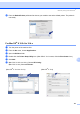
h From the Default Printer pull-down list choose your model to set as the default printer. The printer is
now ready.
For Mac OS
®
X 10.2.4 to 10.4.x 10
a Turn the power of the machine ON.
b From the Go menu, choose Applications.
c Open the Utilities folder.
d Double click the Printer Setup Utility icon. (Mac OS
®
X 10.2.x users, click the Print Center icon.)
e Click Add.
f (Mac OS
®
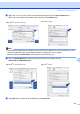
X 10.2.4 to 10.3.x) Choose IP Printing.
(Mac OS
®
X 10.4) Choose IP Printer.
(Mac OS
®
X 10.2.4 to 10.3.x) (Mac OS
®
X 10.4)