
User`s guide

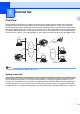


Table Of Contents
- NETWORK USER’S GUIDE MFC-7440N MFC-7840N MFC-7840W
- Table of Contents
- 1 Internet fax
- Overview
- Getting connected
- Control panel key functions
- Sending an Internet fax
- Manually entering text
- Receiving E-mail or Internet fax
- Receiving an Internet fax to your computer
- Forwarding received E-mail and fax messages
- Relay broadcasting
- TX Verification Mail
- Setup Mail TX
- Setup Mail RX
- Error mail
- Important information on Internet fax
- Overview
- 2 Fax operation
- 3 Control panel setup
- LAN menu
- TCP/IP
- Ethernet (wired network only)
- Setup Wizard (MFC-7840W wireless network only)
- SES/WPS/AOSS (MFC-7840W wireless network only)
- WPS w/PIN Code (MFC-7840W wireless network only)
- WLAN Status (MFC-7840W wireless network only)
- Set to Default (MFC-7840W only)
- Wired Enable (MFC-7840W wired network only)
- WLAN Enable (MFC-7840W wireless network only)
- Setup Internet (from the Setup IFAX menu)
- Setup Mail RX (from the Setup IFAX menu)
- Setup Mail TX (from the Setup IFAX menu)
- Setup Relay (from the Setup IFAX menu)
- Scan to E-mail (E-mail server)
- Scan to FTP
- Fax to Server
- Time Zone
- Restoring the network settings to factory default
- Printing the Network Configuration List
- LAN menu
- Appendix A
- Index

1
1
1
Overview 1
Internet faxing (IFAX) allows you to send and receive fax documents using the Internet as the transport
mechanism. Documents are transmitted in E-mail messages as attached TIFF-F files. This means that
computers are also able to receive and send documents, providing that the computer has as an application
that can generate and view TIFF-F files, you can use any TIFF-F viewer application. Any documents sent via
the machine will automatically be converted into a TIFF-F format. If you wish to send and receive messages
to and from your machine, your mail application on the computer must be able to support the MIME format.
Note
Internet Fax is available in Black & White only.
Getting connected 1
Before sending or receiving an Internet fax you must configure your Brother machine to communicate with
your network and mail server. You must ensure the following: a correctly configured IP address for your
machine, an E-mail address for your machine, the mail server(s) IP address, mailbox name and password for
your Brother machine. If you are unsure of any of these items, please contact your systems Administrator.
For details of how to configure this information, see Setup Internet (from the Setup IFAX menu) on page 30.
Internet fax 1
Intenet Fax
E-mail
E-mail
Relay Fax
(G3 TX)
Relay E-mail
Internet
Internet