
User`s guide

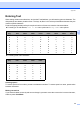
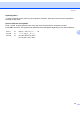
Table Of Contents
- NETWORK USER’S GUIDE MFC-7440N MFC-7840N MFC-7840W
- Table of Contents
- 1 Internet fax
- Overview
- Getting connected
- Control panel key functions
- Sending an Internet fax
- Manually entering text
- Receiving E-mail or Internet fax
- Receiving an Internet fax to your computer
- Forwarding received E-mail and fax messages
- Relay broadcasting
- TX Verification Mail
- Setup Mail TX
- Setup Mail RX
- Error mail
- Important information on Internet fax
- Overview
- 2 Fax operation
- 3 Control panel setup
- LAN menu
- TCP/IP
- Ethernet (wired network only)
- Setup Wizard (MFC-7840W wireless network only)
- SES/WPS/AOSS (MFC-7840W wireless network only)
- WPS w/PIN Code (MFC-7840W wireless network only)
- WLAN Status (MFC-7840W wireless network only)
- Set to Default (MFC-7840W only)
- Wired Enable (MFC-7840W wired network only)
- WLAN Enable (MFC-7840W wireless network only)
- Setup Internet (from the Setup IFAX menu)
- Setup Mail RX (from the Setup IFAX menu)
- Setup Mail TX (from the Setup IFAX menu)
- Setup Relay (from the Setup IFAX menu)
- Scan to E-mail (E-mail server)
- Scan to FTP
- Fax to Server
- Time Zone
- Restoring the network settings to factory default
- Printing the Network Configuration List
- LAN menu
- Appendix A
- Index

Appendix
59
A
Repeating letters A
To enter a character on the same key as the previous character, press c to move the cursor right before
pressing the key again.
Special characters and symbols
A
Press l, # or 0, and then press d or c to move the cursor to the symbol or character you want.
Press OK to choose it. The symbols and characters below will appear depending on your menu selection.
Press l for (space) ! “ # $ % & ’ ( ) l + , - . / m
Press # for : ; < = > ? @ [ ] ^ _ ¥ ˜ ‘ | { }
Press 0 for (For USA) É À È Ê Î Ç Ë Ö 0
(For UK) Ä Ë Ö Ü À Ç È É 0