
User`s guide
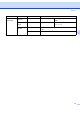
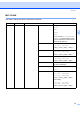
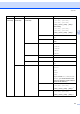
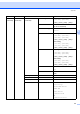
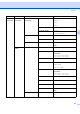
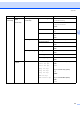

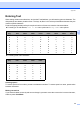
Table Of Contents
- NETWORK USER’S GUIDE MFC-7440N MFC-7840N MFC-7840W
- Table of Contents
- 1 Internet fax
- Overview
- Getting connected
- Control panel key functions
- Sending an Internet fax
- Manually entering text
- Receiving E-mail or Internet fax
- Receiving an Internet fax to your computer
- Forwarding received E-mail and fax messages
- Relay broadcasting
- TX Verification Mail
- Setup Mail TX
- Setup Mail RX
- Error mail
- Important information on Internet fax
- Overview
- 2 Fax operation
- 3 Control panel setup
- LAN menu
- TCP/IP
- Ethernet (wired network only)
- Setup Wizard (MFC-7840W wireless network only)
- SES/WPS/AOSS (MFC-7840W wireless network only)
- WPS w/PIN Code (MFC-7840W wireless network only)
- WLAN Status (MFC-7840W wireless network only)
- Set to Default (MFC-7840W only)
- Wired Enable (MFC-7840W wired network only)
- WLAN Enable (MFC-7840W wireless network only)
- Setup Internet (from the Setup IFAX menu)
- Setup Mail RX (from the Setup IFAX menu)
- Setup Mail TX (from the Setup IFAX menu)
- Setup Relay (from the Setup IFAX menu)
- Scan to E-mail (E-mail server)
- Scan to FTP
- Fax to Server
- Time Zone
- Restoring the network settings to factory default
- Printing the Network Configuration List
- LAN menu
- Appendix A
- Index
Appendix
55
A
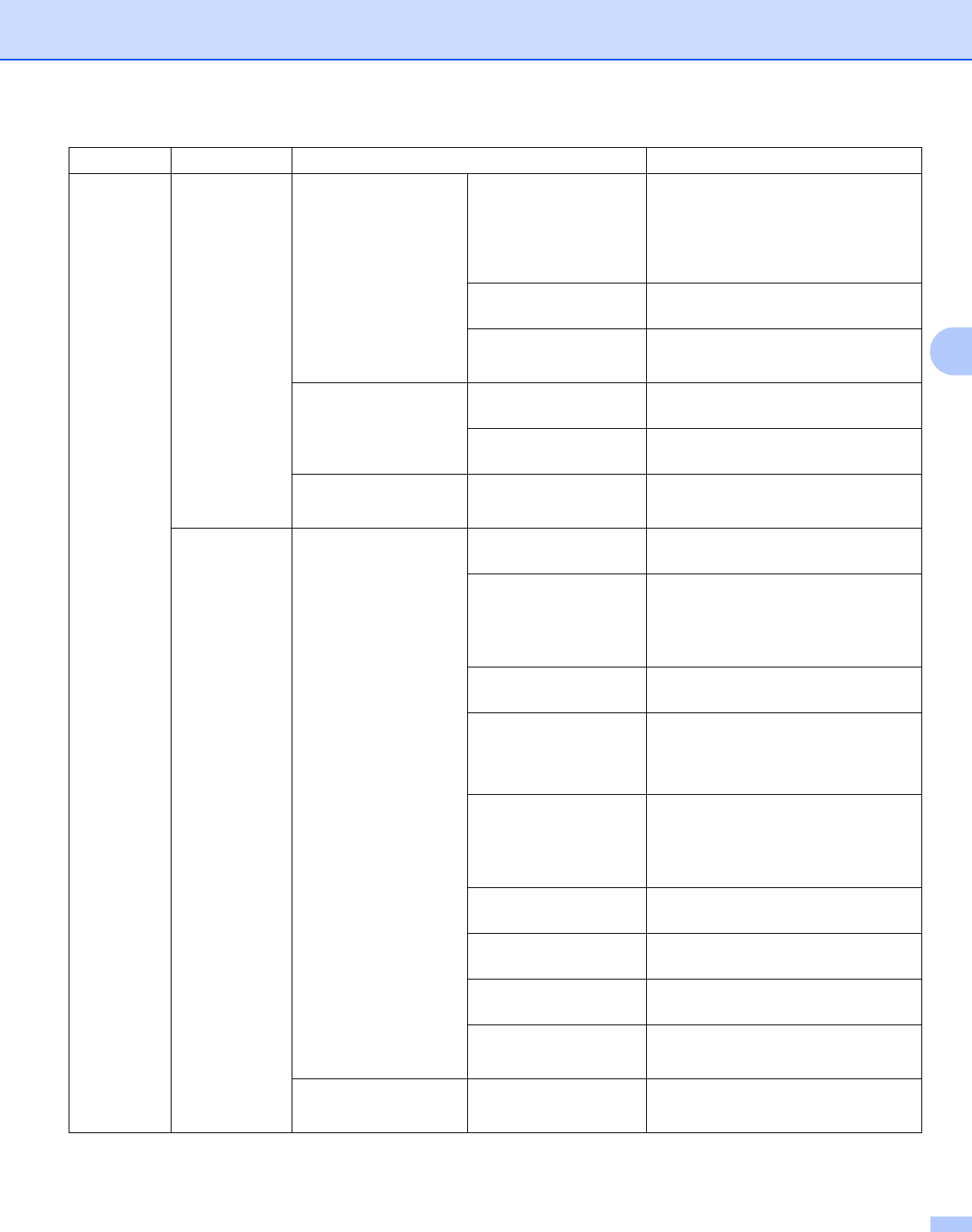
5.LAN
(continued)
2.WLAN
(continued)
5.WLAN Status
(continued)
2.Signal Strong
Medium
Weak
None
3.SSID —
4.Comm. Mode Ad-hoc
Infrastructure
6.Set to Default 1.Reset —
2.Exit —
7.WLAN Enable — On
Off*
3.Setup
IFAX
1.Setup Internet 1.Mail Address —
2.SMTP Server Name (Up to 64 characters)
IP Address
[000-255].[000-255].
[000-255].[000-255]
3.SMTP Port [00001-65535]
4.Auth. for SMTP None*
SMTP-AUTH
POP bef.SMTP
5.POP3 Server Name (Up to 64 characters)
IP Address
[000-255].[000-255].
[000-255].[000-255]
6.POP3 Port [00001-65535]
7.Mailbox Name —
8.Mailbox Pwd (Up to 32 characters)
9.APOP On
Off*
2.Setup Mail RX 1.Auto Polling On*
Off
Main Menu Submenu Menu Selections Options