
User`s guide



156
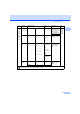
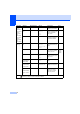
Main Menu Submenu Menu Selections Options Descriptions Page
4.Machine
Info.
(MFC-7340)
5.Machine
Info.
(MFC-7450
and
MFC-7440N)
6.Machine
Info.
(MFC-7840N
and
MFC-7840W)
1.Serial No. — — You can check the serial
number of your machine.
140
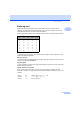
2.
Page Count
er
— Total
Fax/List
Copy
Print
You can check the
number of total pages the
machine has printed
during its life.
140
3.Drum Life — — You can check the
percentage of Drum life
that remains available.
140
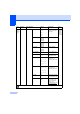
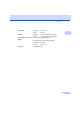
0.Initial
Setup
1.
Receive Mo
de
— Fax Only*
Fax/Tel
External TAD
Manual
Chooses the receive
mode that best suits your
needs.
41
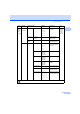
2.Date&Time — — Puts the date and time on
the LCD and in headings
of faxes you send.
See
Quick
Setup
Guide.
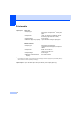
3.Station ID — Fax:
Tel:
Name:
Sets your name and fax
number to appear on each
page you fax.
4.Tone/Pulse
(not available in
New Zealand)
— Tone*
Pulse
Chooses the dialling
mode.
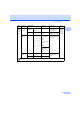
4.Dial Tone
(for New Zealand)
5.Dial Tone
— Detection
No Detection*
You can shorten the
dialling tone detect pause.
112
5.
Dial Prefi
x
(for New Zealand)
6.
Dial Prefi
x
— — Sets a prefix number that
will always be added
before the fax number
every time you dial.
24
The factory settings are shown in Bold with an asterisk.