
User Manual


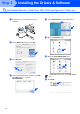



Table Of Contents
- Quick Setup Guide MFC-7420/MFC-7820N
- Getting Started
- Table of Contents
- Step1 Setting Up the Machine
- Step2 Installing the Drivers & Software
- Supplied CD-ROM “MFL-Pro Suite”
- For USB Interface Cable Users (For Windows® 98/98SE/Me/2000 Professional/XP)
- For Parallel Interface Cable Users (For Windows® 98/98SE/Me/2000 Professional/XP)
- For Windows NT® Workstation Version 4.0 Users
- For Network Interface Cable Users (MFC-7820N and Optional NC-2200w only) (For Windows® 98/98SE/Me/NT/2000 Professional/XP)
- For USB Interface Cable Users
- For Network Interface Cable Users (MFC-7820N only)
- For Network Users
- Options and Consumables
- brother UK/IRE/SAF

32
■ For Network Users
The BRAdmin Professional utility is designed to manage your Brother network connected
devices such as network-ready Multifunction devices and/or network-ready printers in a Local
Area Network (LAN) environment.
BRAdmin Professional can also be used to manage devices from other manufacturers whose
products support SNMP (Simple Network Management Protocol).
For more information on BRAdmin Professional go to http://solutions.brother.com
1
Insert the supplied CD-ROM into your CD-ROM drive.
The opening screen will appear automatically.
Follow the on-screen instructions.
2
Click the Install Optional Applications icon on the main menu screen.
3
Click BRAdmin Professional and follow the on-screen instructions.
Installing the BRAdmin Professional
Configuration Utility (Windows
®
only)
The default password for the print server is
“access”. You can use BRAdmin
Professional or a web browser to change
this password.