
User Manual


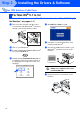


Table Of Contents
- Quick Setup Guide MFC-7420/MFC-7820N
- Getting Started
- Table of Contents
- Step1 Setting Up the Machine
- Step2 Installing the Drivers & Software
- Supplied CD-ROM “MFL-Pro Suite”
- For USB Interface Cable Users (For Windows® 98/98SE/Me/2000 Professional/XP)
- For Parallel Interface Cable Users (For Windows® 98/98SE/Me/2000 Professional/XP)
- For Windows NT® Workstation Version 4.0 Users
- For Network Interface Cable Users (MFC-7820N and Optional NC-2200w only) (For Windows® 98/98SE/Me/NT/2000 Professional/XP)
- For USB Interface Cable Users
- For Network Interface Cable Users (MFC-7820N only)
- For Network Users
- Options and Consumables
- brother UK/IRE/SAF

23
9
From the Apple
®
menu, open the Chooser.
0
Click the Brother Laser icon.
On the right side of the Chooser, select the
machine to which you want to print.
Close the Chooser.
The MFL-Pro Suite, Printer driver and
Scanner driver have been installed.
A
To install Presto!
®
PageManager
®
, click the
Presto! PageManager icon and follow the
on-screen instructions.
Presto!
®
PageManager
®
has been
installed and the installation is now
complete.
ControlCenter2.0 is not supported in Mac OS
®
9.1 to 9.2.
You can easily scan, share and organize
photos and documents using Presto!
®
PageManager
®
.
Installing the Drivers & Software
Setting Up
the Machine
Macintosh
®
USB
For
Network Users