
User Manual


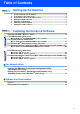


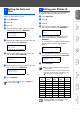

Table Of Contents
- Quick Setup Guide MFC-7420/MFC-7820N
- Getting Started
- Table of Contents
- Step1 Setting Up the Machine
- Step2 Installing the Drivers & Software
- Supplied CD-ROM “MFL-Pro Suite”
- For USB Interface Cable Users (For Windows® 98/98SE/Me/2000 Professional/XP)
- For Parallel Interface Cable Users (For Windows® 98/98SE/Me/2000 Professional/XP)
- For Windows NT® Workstation Version 4.0 Users
- For Network Interface Cable Users (MFC-7820N and Optional NC-2200w only) (For Windows® 98/98SE/Me/NT/2000 Professional/XP)
- For USB Interface Cable Users
- For Network Interface Cable Users (MFC-7820N only)
- For Network Users
- Options and Consumables
- brother UK/IRE/SAF

8
There are four possible receive modes; Fax
Only, Fax/Tel, Manual and External TAD.
Choose the Receive Mode which best suits your
needs.
1
Press Menu/Set.
2
Press 0.
3
Press 1.
4
Press or to select the mode.
5
Press Menu/Set.
6
Press Stop/Exit.
6 Selecting a Receive Mode
Are you connecting an external telephone or external
telephone answering device to the machine?
Are you using the voice
message function of your
external telephone answering
device?
Fax Only
The machine
automatically answers
every call as a fax.
Do you want the
machine to answer fax
and telephone calls
automatically?
Fax/Tel
The machine controls
the line and
automatically answers
every call. If the call is
not a fax, the phone will
ring for you to pick up
the call.
Manual
You control the phone
line and must answer
every call yourself.
External TAD
Your external telephone
answering device (TAD)
automatically answers
every call. Voice
messages are stored on
the external TAD. Fax
messages are printed.
Yes No
Yes
No
No
Yes
For more details, see “Setup Receive” in
Chapter 4 of the User's Guide.
Step 1
Setting Up the Machine