
Quick Setup Guide
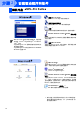
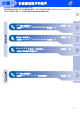
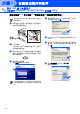
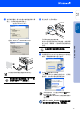
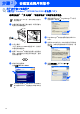
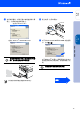

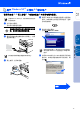
Table Of Contents

10
安装驱动程序和软件
随机光盘包括以下项目:
安装 MFL-Pro Suite
可安装 MFL-Pro Suite 和多功能驱动程序。
安装可选的应用程序
可安装另外的 MFL-Pro Suite 软件实用程序。
文档 *
1
查看PDF格式的使用说明书和其他文档(包括阅读器)。
Brother Solutions Center(Brother 解决方案
中心)
Brother 信息联系中心和网站为您提供最新的信息和技
术支持信息。
修复 MFL-Pro Suite
如果安装 MFL-Pro Suite 时发生错误,使用该选项自
动修复和重新安装 MFL-Pro Suite。
MFL-Pro Suite
可安装用于 Mac OS
®
10.2.4或更高版本的打印机驱动
程序、扫描仪驱动程序和远程设置程序。
Presto!
®
PageManager
®
可安装 Presto!
®
PageManager
®
。
Brother Solutions Center(Brother 解决方案
中心)
可登陆 Brother Solution Center (Brother 解决方案中
心),这是一个提供 Brother 产品信息的网站,包括常
见问题解答、使用说明书、驱动程序更新和使用您
Brother 产品的提示和技巧。
Documentation (文档) *
1
查看 PDF 格式的使用说明书和其他文档。
随机光盘 “MFL-Pro Suite”
MFL-Pro Suite
包括打印机驱动程序、扫描仪驱
动程序、
Presto!
®
PageManager
®
6.10
和
True
Type
®
字体。
PageManager
®
6.10
是用来查看扫描文档的文
档管理应用程序。
PageManager
®
6.10
仅支持
Windows
®
98/98SE/
Me/2000
专业版
/XP
。
*
1
随机光盘上的使用说明书包括了关于当本设备连
接到计算机时的可用功能 (如:
打印和扫描)的
软件使用说明书。
步骤 2