
User Manual
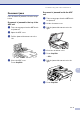




Table Of Contents
- USER’S GUIDE MFC-7420/MFC-7820N
- APPROVAL INFORMATION
- Compilation and Publication Notice
- EC Declaration of Conformity
- Safety precautions
- Quick Reference Guide
- Table of Contents
- 1 Introduction
- 2 Getting started
- Initial setup
- General Setup
- Setting the Mode Timer
- Setting the Paper Type
- Setting the Paper Size
- Setting the Ring Volume
- Setting the Beeper Volume
- Setting the Speaker Volume
- Turning on Automatic Daylight Savings Time
- Toner Save
- Sleep Time
- Setting the LCD Contrast
- Security
- TX Lock (MFC-7420 only)
- Memory Security (MFC-7820N only)
- Setting Lock
- 3 Setup Send
- 4 Setup Receive
- 5 Quick-Dial numbers and dialling options
- 6 Remote Fax Options
- 7 Printing reports
- 8 Making copies
- 9 Software and Network Features
- 10 Important information
- 11 Troubleshooting and routine maintenance
- Appendix A
- Appendix B
- Glossary
- Specifications
- Index
- Remote Retrieval Access card
- brother UK/IRE/SAF

Troubleshooting and routine maintenance
11 - 6
11
Document jams
If the document is jammed, follow the steps
below.
Document is jammed in the top of the
ADF unit
1 Take out any paper from the ADF that is
not jammed.
2
Open the ADF cover.
3
Pull the jammed document out to the
left.
4
Close the ADF cover.
Press Stop/Exit.
Document is jammed inside the ADF
unit
1
Take out any paper from the ADF that is
not jammed.
2
Lift the document cover.
3 Pull the jammed document out to the
right.
4
Close the document cover.
5
Press Stop/Exit.
—OR—
1
Pull the jammed document out to the
right.
2
Press Stop/Exit.