
User Manual


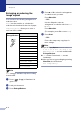
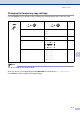
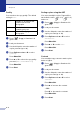
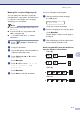

Table Of Contents
- USER’S GUIDE MFC-7420/MFC-7820N
- APPROVAL INFORMATION
- Compilation and Publication Notice
- EC Declaration of Conformity
- Safety precautions
- Quick Reference Guide
- Table of Contents
- 1 Introduction
- 2 Getting started
- Initial setup
- General Setup
- Setting the Mode Timer
- Setting the Paper Type
- Setting the Paper Size
- Setting the Ring Volume
- Setting the Beeper Volume
- Setting the Speaker Volume
- Turning on Automatic Daylight Savings Time
- Toner Save
- Sleep Time
- Setting the LCD Contrast
- Security
- TX Lock (MFC-7420 only)
- Memory Security (MFC-7820N only)
- Setting Lock
- 3 Setup Send
- 4 Setup Receive
- 5 Quick-Dial numbers and dialling options
- 6 Remote Fax Options
- 7 Printing reports
- 8 Making copies
- 9 Software and Network Features
- 10 Important information
- 11 Troubleshooting and routine maintenance
- Appendix A
- Appendix B
- Glossary
- Specifications
- Index
- Remote Retrieval Access card
- brother UK/IRE/SAF

Making copies
8 - 4
8
Changing the temporary copy settings
Use the Options key to quickly set the following copy settings temporarily for the next copy.
Note
The factory settings are shown in Bold.
After you choose your settings by pressing Menu/Set, the LCD shows Set temporarily.
Press Start if you have finished choosing settings.
Press Menu Selections Options Page
Quality Auto
Text
Photo
8-5
Stack/Sort Stack
Sort
8-5
Contrast ▼ -
+ ▲
▼ -
+ ▲
▼ -
+ ▲
▼ -
+ ▲
▼ -
+ ▲
8-5
Page Layout
Off(1 in 1)
2 in 1 (P)
2 in 1 (L)
4 in 1 (P)
4 in 1 (L)
Poster(3 x 3)
8-6
select select