
User Manual


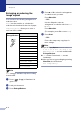
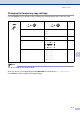
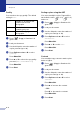
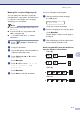

Table Of Contents
- USER’S GUIDE MFC-7420/MFC-7820N
- APPROVAL INFORMATION
- Compilation and Publication Notice
- EC Declaration of Conformity
- Safety precautions
- Quick Reference Guide
- Table of Contents
- 1 Introduction
- 2 Getting started
- Initial setup
- General Setup
- Setting the Mode Timer
- Setting the Paper Type
- Setting the Paper Size
- Setting the Ring Volume
- Setting the Beeper Volume
- Setting the Speaker Volume
- Turning on Automatic Daylight Savings Time
- Toner Save
- Sleep Time
- Setting the LCD Contrast
- Security
- TX Lock (MFC-7420 only)
- Memory Security (MFC-7820N only)
- Setting Lock
- 3 Setup Send
- 4 Setup Receive
- 5 Quick-Dial numbers and dialling options
- 6 Remote Fax Options
- 7 Printing reports
- 8 Making copies
- 9 Software and Network Features
- 10 Important information
- 11 Troubleshooting and routine maintenance
- Appendix A
- Appendix B
- Glossary
- Specifications
- Index
- Remote Retrieval Access card
- brother UK/IRE/SAF

Chapter 8
8 - 3
Enlarging or reducing the
image copied
You can select the following enlargement or
reduction ratios.
Auto* sets the machine to calculate the
reduction ratio that best fits the size of paper.
Custom(25-400%) allows you to enter a
ratio from 25% to 400%.
Note
Auto setting is available only when loading
from the ADF.
1
Press (Copy) to illuminate it in
green.
2
Load your document.
3
Press Enlarge/Reduce.
4
Press ▲ or ▼ to select the enlargement
or reduction ratio you want.
Press Menu/Set.
—OR—
Use the dial pad to enter an
enlargement or reduction ratio from
25%
to
400%.
Press Menu/Set.
(For example, press 5 3 to enter
53%.)
5
Press Start.
—OR—
Press other temporary copy keys for
more settings.
Note
■ Special Copy Options 2 in 1 (P),
2 in 1 (L), 4 in 1 (P), 4 in 1 (L)
or
Poster(3 x 3) are not available with
Enlarge/Reduce.
■ (P) means Portrait and (L) means
Landscape.
■ After you choose your settings by pressing
Menu/Set, the LCD shows
Set temporarily.
Press
Enlarge/Reduce
100%
104% EXE→ LTR
141% A5→ A4
200%
Auto*
Custom(25-400%)
50%
70% A4→ A5
78% LGL→ LTR
83% LGL→ A4
85% LTR→ EXE
91% Full Page
94% A4→ LTR
97% LTR→ A4