
User Manual

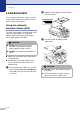



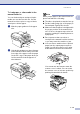


Table Of Contents
- USER’S GUIDE MFC-7420/MFC-7820N
- APPROVAL INFORMATION
- Compilation and Publication Notice
- EC Declaration of Conformity
- Safety precautions
- Quick Reference Guide
- Table of Contents
- 1 Introduction
- 2 Getting started
- Initial setup
- General Setup
- Setting the Mode Timer
- Setting the Paper Type
- Setting the Paper Size
- Setting the Ring Volume
- Setting the Beeper Volume
- Setting the Speaker Volume
- Turning on Automatic Daylight Savings Time
- Toner Save
- Sleep Time
- Setting the LCD Contrast
- Security
- TX Lock (MFC-7420 only)
- Memory Security (MFC-7820N only)
- Setting Lock
- 3 Setup Send
- 4 Setup Receive
- 5 Quick-Dial numbers and dialling options
- 6 Remote Fax Options
- 7 Printing reports
- 8 Making copies
- 9 Software and Network Features
- 10 Important information
- 11 Troubleshooting and routine maintenance
- Appendix A
- Appendix B
- Glossary
- Specifications
- Index
- Remote Retrieval Access card
- brother UK/IRE/SAF

Introduction
1 - 12
1
To load paper or other media in the
manual feed slot
You can load envelopes and special print
media one at a time into this slot. Use the
manual feed slot to print or copy on labels,
envelopes or thicker paper.
1 Slide the paper guides to fit the paper
size.
2
Using both hands put one sheet of paper
in the manual feed slot until you feel the
front edge of the paper touch the paper
feed roller. Let go of the paper when you
feel the machine feed the paper in a
short distance.
Note
When you put paper in the manual feed slot,
please remember the following:
■ The side to be printed on must be face up.
■ Put the leading edge (top of the paper) in
first and push it gently into the slot.
■ Make sure that the paper is straight and in
the proper position on the manual feed
slot. If it is not, the paper may not be fed
properly, resulting in a skewed printout or
a paper jam.
■ Do not put more than one sheet or
envelope in the manual feed slot at a time
or you may cause the machine to jam.
■ You can remove smaller sizes of printed
paper from the output paper tray more
easily if you lift the scanner cover using
both hands as shown in the illustration.
You can still use the machine when the
scanner cover is raised. You can return
the scanner cover to its home position by
pushing it down with both hands.