
User Manual

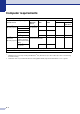



Table Of Contents
- USER’S GUIDE MFC-7420/MFC-7820N
- APPROVAL INFORMATION
- Compilation and Publication Notice
- EC Declaration of Conformity
- Safety precautions
- Quick Reference Guide
- Table of Contents
- 1 Introduction
- 2 Getting started
- Initial setup
- General Setup
- Setting the Mode Timer
- Setting the Paper Type
- Setting the Paper Size
- Setting the Ring Volume
- Setting the Beeper Volume
- Setting the Speaker Volume
- Turning on Automatic Daylight Savings Time
- Toner Save
- Sleep Time
- Setting the LCD Contrast
- Security
- TX Lock (MFC-7420 only)
- Memory Security (MFC-7820N only)
- Setting Lock
- 3 Setup Send
- 4 Setup Receive
- 5 Quick-Dial numbers and dialling options
- 6 Remote Fax Options
- 7 Printing reports
- 8 Making copies
- 9 Software and Network Features
- 10 Important information
- 11 Troubleshooting and routine maintenance
- Appendix A
- Appendix B
- Glossary
- Specifications
- Index
- Remote Retrieval Access card
- brother UK/IRE/SAF

S - 7
Computer requirements
Minimum System Requirements
Computer Platform & Operating
System Version
Processor
Minimum
Speed
Minimum
RAM
Recommended
RAM
Available Hard Disk Space
for Drivers for
Applications
Windows
®
Operating System
98, 98SE Pentium
®
II
or equivalent
32 MB 64 MB 90 MB 130 MB
Me
NT
®
Workstation 4.0 64 MB 128 MB
2000 Professional
XP
1
128 MB 256 MB 150 MB 220 MB
Apple
®
Macintosh
®
Operating System
Mac OS
®
9.1 - 9.2
(Printing, Scanning
2
and PC Fax Sending
Only)
All base models meet
minimum
Requirements
64 MB 80 MB 200 MB
Mac OS
®
X 10.2.4
or greater
128 MB 160 MB
NOTE: All registered trademarks referenced herein are the property of their respective companies.
For the latest drivers, go to the Brother Solutions Center at http://solutions.brother.com/
1
Maximum 1200 x 1200 dpi scanning with Windows
®
XP. (Resolutions up to 9600 x 9600 dpi can be selected using
the Brother Utility.)
2
Dedicated “Scan” key and direct Network Scanning (MFC-7820N) supported in Mac OS
®
X 10.2.4 or greater.