
User Manual
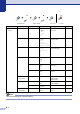



Table Of Contents
- USER’S GUIDE MFC-7420/MFC-7820N
- APPROVAL INFORMATION
- Compilation and Publication Notice
- EC Declaration of Conformity
- Safety precautions
- Quick Reference Guide
- Table of Contents
- 1 Introduction
- 2 Getting started
- Initial setup
- General Setup
- Setting the Mode Timer
- Setting the Paper Type
- Setting the Paper Size
- Setting the Ring Volume
- Setting the Beeper Volume
- Setting the Speaker Volume
- Turning on Automatic Daylight Savings Time
- Toner Save
- Sleep Time
- Setting the LCD Contrast
- Security
- TX Lock (MFC-7420 only)
- Memory Security (MFC-7820N only)
- Setting Lock
- 3 Setup Send
- 4 Setup Receive
- 5 Quick-Dial numbers and dialling options
- 6 Remote Fax Options
- 7 Printing reports
- 8 Making copies
- 9 Software and Network Features
- 10 Important information
- 11 Troubleshooting and routine maintenance
- Appendix A
- Appendix B
- Glossary
- Specifications
- Index
- Remote Retrieval Access card
- brother UK/IRE/SAF

B - 7
2. Fax
(Continued)
6. Remaining
Jobs
— — Checks which jobs are in
the memory and lets you
cancel selected jobs.
3-8
0.
Miscellaneous
1.
Compatibility
(For MFC-7420)
Normal
Basic
Adjusts the Equalization
for transmission problems.
11-20
1.
Compatibility
(For MFC-7820N)
High
Normal
Basic
Adjusts the Equalization
for transmission problems.
11-20
2. BT Call Sign On
Off
Uses with BT Call Sign. A-1
3. Copy 1. Quality — Text
Auto
Photo
Selects the Copy
resolution for your type of
document.
8-8
2. Contrast —
▼
-+
▲
▼
-+
▲
▼
-
+ ▲
▼
-+
▲
▼
-+
▲
Adjusts the contrast for
copies.
8-8
4.
Printer
(MFC-7820N
only)
1. Emulation — Auto
HP LaserJet
BR-Script 3
Selects the emulation
mode.
See
Software
User’s
Guide on
the
CD-ROM
2. Print
Options
1. Internal
Font
— Prints a list of the
machine’s internal fonts.
2.
Configuration
— Prints a list of the
machine’s printer settings.
3. Reset
Printer
— — Returns the printer
settings (PCL) to the
original factory default
settings.
Main Menu Submenu Menu Selections Options Descriptions Page
Note
The factory settings are shown in Bold.
to exitSelect & Set Select & Set to accept