
User Manual

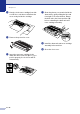
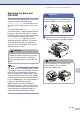



Table Of Contents
- USER’S GUIDE MFC-7420/MFC-7820N
- APPROVAL INFORMATION
- Compilation and Publication Notice
- EC Declaration of Conformity
- Safety precautions
- Quick Reference Guide
- Table of Contents
- 1 Introduction
- 2 Getting started
- Initial setup
- General Setup
- Setting the Mode Timer
- Setting the Paper Type
- Setting the Paper Size
- Setting the Ring Volume
- Setting the Beeper Volume
- Setting the Speaker Volume
- Turning on Automatic Daylight Savings Time
- Toner Save
- Sleep Time
- Setting the LCD Contrast
- Security
- TX Lock (MFC-7420 only)
- Memory Security (MFC-7820N only)
- Setting Lock
- 3 Setup Send
- 4 Setup Receive
- 5 Quick-Dial numbers and dialling options
- 6 Remote Fax Options
- 7 Printing reports
- 8 Making copies
- 9 Software and Network Features
- 10 Important information
- 11 Troubleshooting and routine maintenance
- Appendix A
- Appendix B
- Glossary
- Specifications
- Index
- Remote Retrieval Access card
- brother UK/IRE/SAF

Troubleshooting and routine maintenance
11 - 28
11
Replacing the drum unit
(DR-2000)
The machine uses a drum unit to create print
images on paper. If the LCD shows
Change Drum Soon
, the drum unit is near
the end of its life and it is time to buy a new
one.
Even if the LCD shows
Change Drum Soon
,
you may be able to continue printing without
having to replace the drum unit for a while.
However, if there is a noticeable deterioration
in the output print quality (even before
Change Drum Soon
appears), then the
drum unit should be replaced. You should
clean the machine when you replace the
drum unit. (See Cleaning the laser scanner
window on page 11-23.)
Note
The drum unit is a consumable item, and it is
necessary to replace it periodically. There are
many factors that determine the drum life,
such as temperature, humidity, type of paper
and how much toner you use for the number
of pages per print job. The estimated drum life
is up to 12,000 pages. The actual number of
pages your drum will print may be
significantly less than these estimates.
Because we have no control over the many
factors that determine the actual drum life, we
cannot guarantee a minimum number of
pages that will be printed by your drum.
1
Open the front cover and pull out the
drum unit and toner cartridge assembly.
CAUTION
When removing the drum unit, handle it
carefully because it contains toner. If toner
scatters and your hands or clothes get
dirty, immediately wipe or wash with cold
water.
WARNING
Just after you have used the machine,
some internal parts of the machine are
extremely HOT! So please be careful.
CAUTION
To prevent damage to the printer from
static electricity, do not touch the
electrodes shown below.