
User Manual
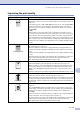
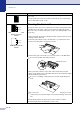
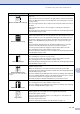
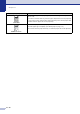

Table Of Contents
- USER’S GUIDE MFC-7420/MFC-7820N
- APPROVAL INFORMATION
- Compilation and Publication Notice
- EC Declaration of Conformity
- Safety precautions
- Quick Reference Guide
- Table of Contents
- 1 Introduction
- 2 Getting started
- Initial setup
- General Setup
- Setting the Mode Timer
- Setting the Paper Type
- Setting the Paper Size
- Setting the Ring Volume
- Setting the Beeper Volume
- Setting the Speaker Volume
- Turning on Automatic Daylight Savings Time
- Toner Save
- Sleep Time
- Setting the LCD Contrast
- Security
- TX Lock (MFC-7420 only)
- Memory Security (MFC-7820N only)
- Setting Lock
- 3 Setup Send
- 4 Setup Receive
- 5 Quick-Dial numbers and dialling options
- 6 Remote Fax Options
- 7 Printing reports
- 8 Making copies
- 9 Software and Network Features
- 10 Important information
- 11 Troubleshooting and routine maintenance
- Appendix A
- Appendix B
- Glossary
- Specifications
- Index
- Remote Retrieval Access card
- brother UK/IRE/SAF

Chapter 11
11 - 19
Curl or wave
Check the paper type and quality. High temperatures and high humidity will cause
paper to curl.
If you don’t use the machine very often, the paper may have been in the paper tray
too long. Turn over the stack of paper in the paper tray. Also, fan the paper stack
and then rotate the paper 180° in the paper tray.
Wrinkles or creases
Make sure that paper is loaded properly.
Check the paper type and quality. (See About paper on page 1-9.)
Turn over the stack of paper in the tray or rotate the paper 180° in the input tray.
Examples of poor print quality Recommendation
B DEFGH
abc efghijk
ACD
bcde
134