
User`s guide



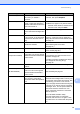
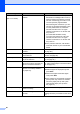
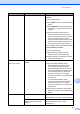

Table Of Contents
- Basic User’s Guide FAX-2840/FAX-2950/MFC-7240/MFC-7290
- User’s Guides and where do I find them?
- Download optional software from the Brother Solutions Center (FAX-2840 users only)
- Table of Contents
- 1 General information
- 2 Loading paper
- 3 Loading documents
- 4 Sending a fax
- 5 Receiving a fax
- 6 Using PC-FAX (For FAX-2950, MFC-7240 and MFC-7290)
- 7 Telephone and external devices
- Voice operations
- Telephone line services
- Telephone Service for Australia
- Telephone Service for New Zealand
- Telephone Service for Some Countries
- Connecting an external TAD
- External and extension telephones
- 8 Dialling and storing numbers
- 9 Making copies
- 10 How to print from a computer (For FAX-2950, MFC-7240 and MFC-7290)
- 11 How to scan to a computer (For FAX-2950, MFC-7240 and MFC-7290)
- A Routine maintenance
- B Troubleshooting
- C Menu and features
- D Specifications
- Index

82
Replace Toner The toner cartridge is at the end
of its life. The machine will stop
printing until you replace the toner
cartridge.
While memory is available, faxes
will be stored in the memory.
If you have set the Toner setting to Stop,
replace the toner cartridge with a new and
unused original Brother toner cartridge. This
will reset the Replace Toner mode. (See
Replacing the toner cartridge uu page 55.)
If you have set the Toner setting to
Continue, the machine will continue to
print data until the LCD shows Toner
Ended. For how to operate the machine in
Continue mode, see Advanced User’s
Guide: Toner Settings.
Scan Unable XX
(XX = Error Code)
The machine has a mechanical
problem.
(For FAX-2840 and MFC-7240)
See Transferring your faxes or Fax
Journal report uu page 83 before
disconnecting the machine so you will
not lose any important messages. Then,
turn the power switch off, wait a few
seconds, and then turn it on again.
Leave the machine for 15 minutes with
the power on.
(For FAX-2950 and MFC-7290)
Turn the power switch off, wait a few
seconds, and then turn it on again.
Leave the machine for 15 minutes with
the power on.
If the problem continues, call Brother
Customer Service or your local Brother
dealer.
Size mismatch The paper in the tray is not a
correct size.
Load an appropriate size of paper in the
tray, and re-set the “Paper Size” (Menu, 1,
2, 2). (See Paper Size uu page 17.)
Toner Ended It is time to replace the toner
cartridge.
While memory is available, faxes
will be stored in the memory.
Replace the toner cartridge with a new one.
(See Replacing the toner cartridge
uu page 55.)
Toner Low If the LCD shows Toner Low you
can still print; however, the
machine is telling you that the
toner cartridge is near the end of
its life.
Order a new toner cartridge now so a
replacement toner cartridge will be available
when the LCD shows Replace Toner or
Toner Ended.
Error Message Cause Action