
User`s guide
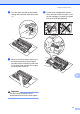





Table Of Contents
- Basic User’s Guide FAX-2840/FAX-2950/MFC-7240/MFC-7290
- User’s Guides and where do I find them?
- Download optional software from the Brother Solutions Center (FAX-2840 users only)
- Table of Contents
- 1 General information
- 2 Loading paper
- 3 Loading documents
- 4 Sending a fax
- 5 Receiving a fax
- 6 Using PC-FAX (For FAX-2950, MFC-7240 and MFC-7290)
- 7 Telephone and external devices
- Voice operations
- Telephone line services
- Telephone Service for Australia
- Telephone Service for New Zealand
- Telephone Service for Some Countries
- Connecting an external TAD
- External and extension telephones
- 8 Dialling and storing numbers
- 9 Making copies
- 10 How to print from a computer (For FAX-2950, MFC-7240 and MFC-7290)
- 11 How to scan to a computer (For FAX-2950, MFC-7240 and MFC-7290)
- A Routine maintenance
- B Troubleshooting
- C Menu and features
- D Specifications
- Index

Routine maintenance
75
A
d Wipe the two pick-up rollers (1) inside of
the machine to remove dust.
e Put the paper tray back in the machine.
f Plug the machine’s power cord back into
the electrical socket. Turn on the
machine.
Checking the machine A
Checking the Page Counters A
You can see the machine’s Page Counters
for copies, printed pages, reports, lists and
faxes or a summary total.
a Press Menu, 5, 2.
b Press a or b to see Total, Fax/List,
Copy or Print.
c Press Stop/Exit.
Checking the remaining life of
parts A
You can see the machine’s parts life on the
LCD.
a Press Menu, 5, 3.
b Press Stop/Exit.
1